.png)


Key Takeaways
- Technical SEO is the invisible foundation of your SaaS site: if Google can't crawl, render, and index your pages correctly, no amount of content or link building will deliver results.
- The most common SaaS-specific issues: JavaScript rendering failures, duplicate URLs from filters and parameters, orphan pages, and misconfigured canonicals, are easy to miss but quietly tank your organic performance.
- Technical SEO is an ongoing process, not a one-time fix; regular audits using tools like Screaming Frog, Ahrefs, and Google Search Console are essential as your site grows and changes.
Technical SEO is the part of SEO that nobody sees, but everybody feels.
When it is done well, your content ranks, your pages get indexed quickly, and Google understands exactly what your SaaS business is about. When it is broken, everything else suffers quietly in the background.
In this article, we have covered technical SEO areas that matters for SaaS websites, explain what can go wrong, and give you practical steps to audit and fix each one.
Let’s dive in!
What is Technical SEO for SaaS?
Technical SEO for SaaS is the process of optimizing the technical foundation of your website so that search engines can properly crawl, understand, and index your content. It covers everything from how your pages are structured and linked, to how fast they load and how Google reads them.
Importance of Technical SEO for SaaS
Most SaaS companies invest heavily in content and link building, but overlook the technical foundation that makes all of that work visible to Google.
Search engine crawlers, including AI-powered ones, need to be able to access and accurately interpret every page on your site.
No matter how strong your content strategy is, if Google cannot properly crawl and understand your pages, the results will always fall short. Technical SEO is not optional; it is the layer on which everything else depends.
How to do a Technical SEO Audit for SaaS?
A technical SEO audit for SaaS covers several interconnected areas, each of which can silently hold back your organic performance if left unchecked.
Below are the key areas to audit, what to look for, and how to fix what you find.
Crawlability
Crawlability refers to how easily search engine bots can access and navigate your website. If a page can't be crawled, it can't be indexed, and it won't rank, no matter how good the content is.
Here are the three important parts to take care of about the crawlability process:
1. Robots.txt file
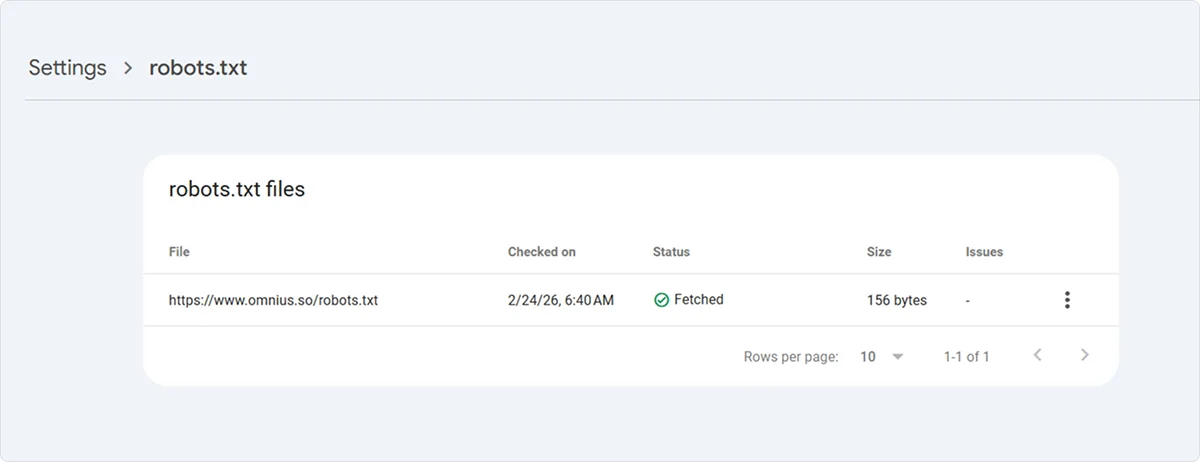
The robots.txt file tells search crawlers which parts of your site they can and cannot access. A misconfigured robots.txt is one of the most damaging technical SEO mistakes you can make, especially after a site migration or CMS change.
After big changes or CMS updates, check the robots.txt file, which is under /robots.txt after the root domain. Also, take care of the insights inside the Google Search Console.
2. Crawl Budget
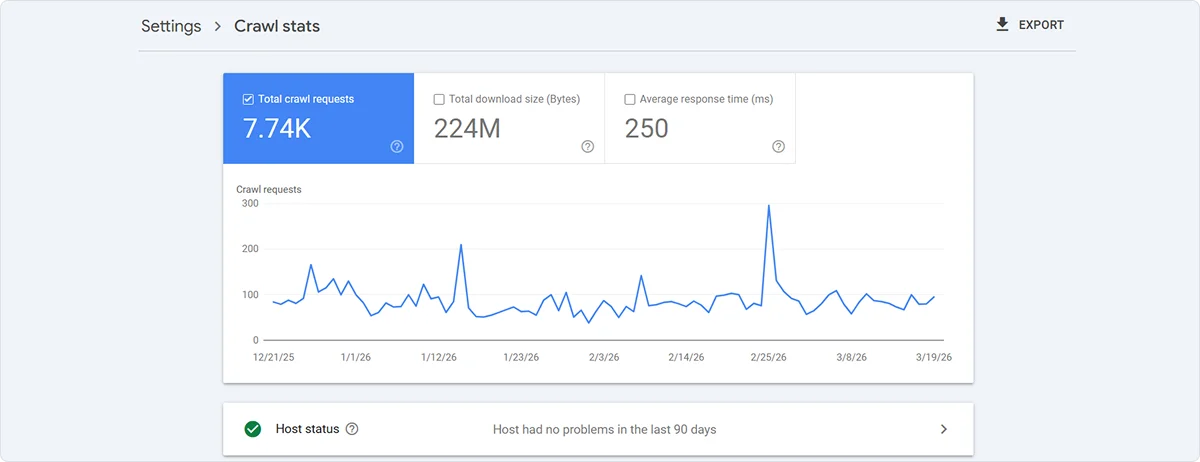
Crawl budget represents the number of pages Googlebot will crawl within a given timeframe.
For small SaaS sites, this is rarely an issue, but if your product generates thousands of URLs through filters, user profiles, or dynamic parameters, it matters.
The main signs of a crawl budget problem are important pages that aren't indexed despite being live for months, or a large number of "Discovered but not indexed" pages in GSC.
Fix it by blocking low-value URLs, cleaning up redirect chains, removing unnecessary URL parameters, and improving page speed or adding new internal links to those pages.
Crawl budget is growing, followed by the authority and trust your website is giving, and it’s recognized by Google.
3. JavaScript Rendering
The third area, and the most SaaS-specific one, is JavaScript rendering. Most SaaS sites are built on frameworks like React or Vue, and Googlebot processes JavaScript in a second wave, which can delay indexing or miss content entirely if rendering fails.
To check if this affects you, open the URL Inspection tool in GSC, click “Test Live URL”, and go to the “View Tested Page” and then the “Screenshot” tab.
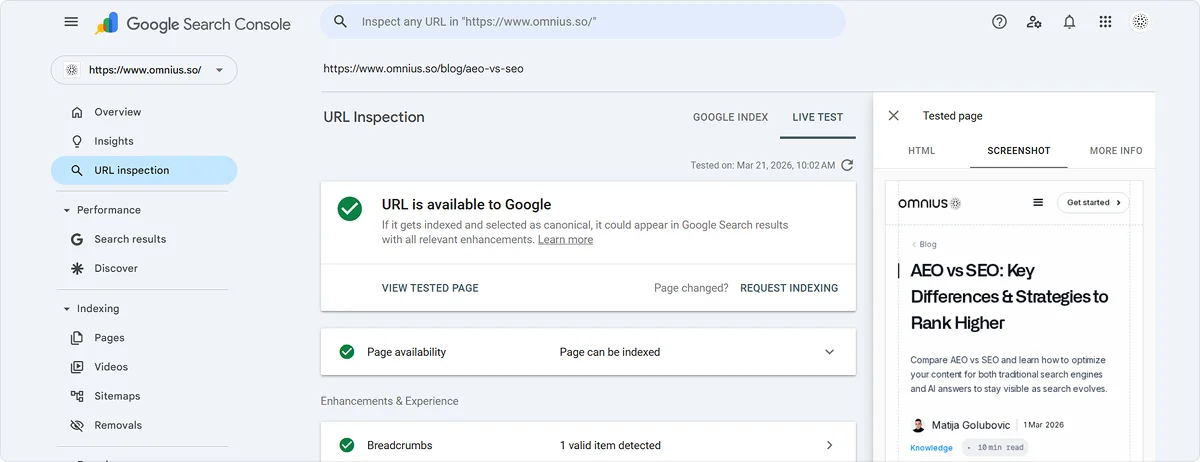
That is exactly what Google sees.
If the page looks broken or empty, implement server-side rendering (SSR) or static site generation (SSG).
At a minimum, ensure your key content is present in the raw HTML before JavaScript loads.
Indexing
Indexing is the process by which Google stores and organizes your pages in its search index so they can appear in search results. It comes after the crawlability and discoverability parts.
A page can only rank if it is indexed. Crawling and indexing are related but separate; Google can crawl a page and still choose not to index it.
How to Check Your Indexing Status?
Go to Google Search Console and open the “Pages” report.
This breaks down all URLs into indexed and not indexed, with a reason for each.
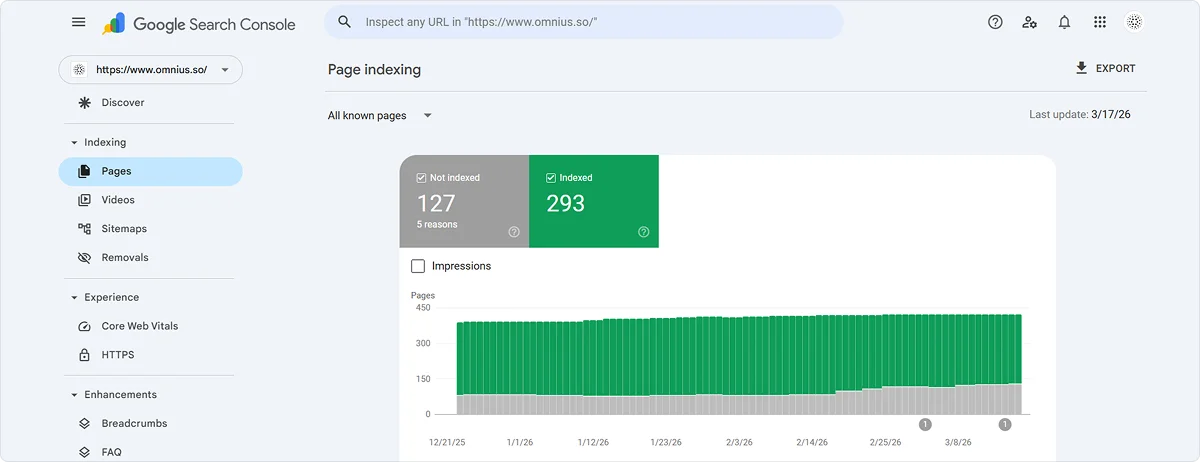
The two most common issues on SaaS sites are:
- "Crawled but currently not indexed," which means Google visited the page but decided not to include it (usually a thin or duplicate content issue), and
- "Discovered but currently not indexed," which means Google knows the page exists but hasn't crawled it yet (usually a crawl budget issue).
You can also run “site:yourdomain.com” in Google and compare the result count to your actual page count. A big gap is a red flag worth investigating.
Noindex Tags
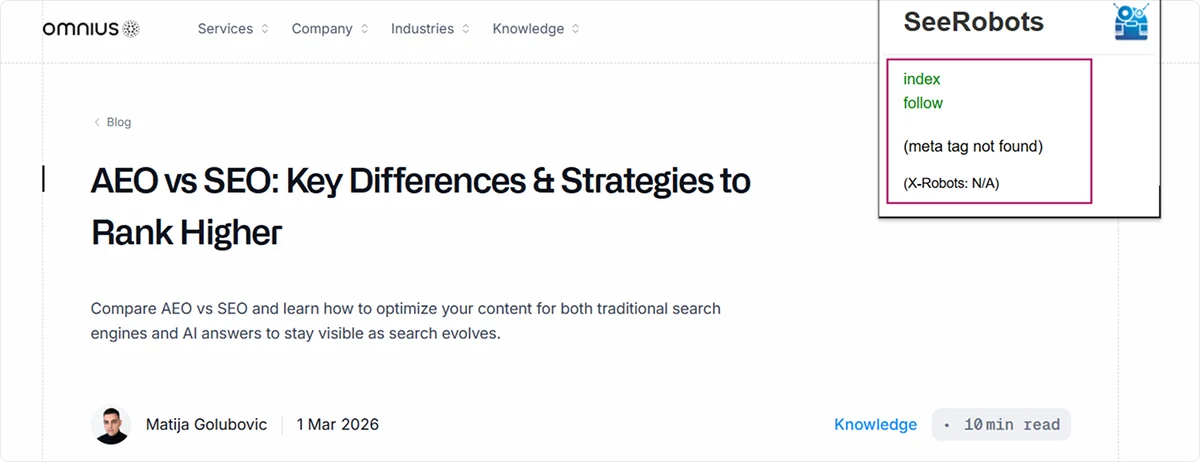
A noindex tag tells Google to exclude a page from the index. Use it carefully and only on pages that should genuinely never appear in search results. Every noindex decision should be intentional.
The tag itself is simple to implement. Add this inside the head of the page:
<meta name="robots" content="noindex, nofollow">
For fast checking of noindex tags across your site without diving into the code, the SeeRobots browser extension is a practical tool that shows the robots meta tag status of any page you visit directly in your browser.
Duplicate Content
Duplicate content occurs when the same or very similar content appears on multiple URLs.
Google doesn't penalize duplicate content in most cases, but it does create a real problem. Google has to choose which version to rank, and it often doesn't pick the one you want.
For SaaS sites, duplicate content is extremely common because of how modern websites are built and structured.
Here are the common causes of duplicate content for SaaS websites:
- URL parameters: Your site might serve the same page under multiple URLs, like /pricing, /pricing?ref=homepage, and /pricing?utm_source=email. Google sees these as separate pages with identical content.
- WWW vs. non-WWW and HTTP vs. HTTPS: If www.yourdomain.com and yourdomain.com both load the same content without a proper redirect, you have duplicate content across two versions of your entire site.
- Trailing slashes: /features and /features/ are technically different URLs. If both return a 200 response with the same content, that's duplication.
- Faceted navigation and filters: SaaS products with filtering (e.g., integration directories, template libraries) often generate hundreds of URL combinations like /integrations?category=crm&sort=popular that all show near-identical content.
- Articles targeting the same keyword: Over time, SaaS blogs often accumulate multiple articles covering the same topic from slightly different angles. Google sees these as competing pages and splits ranking signals between them rather than consolidating them on a single strong page.
How to Find Duplicate Content
Here are the two ways to find duplicate content:
- Run a Screaming Frog crawl and check the "Duplicate Pages" and "Near Duplicates" tabs
- In the GSC → Pages report, look for a high number of "Duplicate without canonical tag" or "Duplicate, Google chose a different canonical than the user" warnings.
How to Fix the Duplicate Pages Issue
- Add canonical tags pointing to the preferred URL version
- Set up proper 301 redirects so only one version of each URL is accessible
- Consolidate near-duplicate pages by merging content rather than maintaining multiple thin versions
Canonical Tags
A canonical tag is a line of HTML that tells Google which version of a page is the official one to index and rank. It is the primary tool for resolving duplicate content issues without removing pages entirely.
Self-Referencing Canonicals
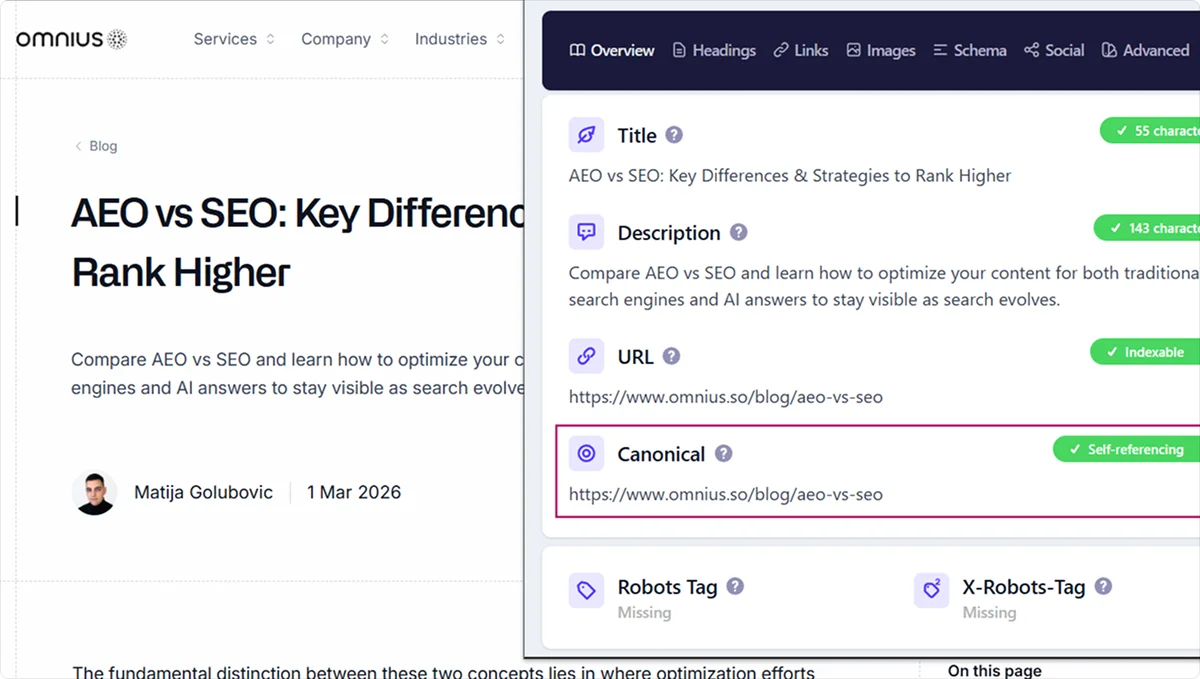
Every page on your site should have a canonical tag, including pages that are not duplicates.
A self-referencing canonical, where a page points to itself, prevents Google from assigning canonicity to an unintended URL version if someone links to your page with tracking parameters or UTM tags attached.
This is a small implementation step that prevents a large class of problems down the line.
Common Canonical Mistakes on SaaS Sites
Here are some of the most common canonical tag mistakes a SaaS website can have:
- Canonicalizing to a noindexed page is one of the most frequent ones. If the canonical destination has a noindex tag, Google can drop that page from the index, so always make sure the canonical target is indexable.
- Conflicting signals happen when your canonical tag and your redirect setup point in different directions. For example, if page A has a canonical tag pointing to page B, but page B redirects to page C, Google receives two contradictory instructions and may ignore both. Always make sure your canonical tags and redirects are aligned and pointing to the same final destination.
- CMS-generated canonical conflicts are also worth watching out for. Some platforms, WordPress in particular, with certain plugins, automatically generate canonical tags that conflict with manually set ones. Always verify the rendered HTML, not just the template settings.
How to Audit Canonical Tags?
There are three main ways to audit canonical tags across your site.
- The first is Screaming Frog. Go to Directives and open the Canonical tab to see the canonical tag on every crawled URL across your entire site in one view.
- The second is Google Search Console. Filter the Pages report for "Duplicate, Google chose a different canonical than the user." This means Google is overriding your canonical, which usually points to a conflicting signal somewhere on the page.
- The third is the Detailed SEO Extension, a browser extension that shows you the canonical tag of any page you are currently visiting without touching the code.
Structured Data
Structured data is code added to your pages that helps search engines understand what your content is about, not just the words on the page, but the meaning behind them.
It uses a standardized format called Schema.org and is typically implemented as JSON-LD in the <head> of your page.
Beyond traditional search, structured data is also important for AI search engines and Google's AI Overviews, which rely on structured signals to accurately represent your product in generated answers.
Key Schema Types for SaaS
- Organization schema: is the foundational schema type for SaaS. It tells Google the essential details about your company, such as your name, logo, website, and contact information. It helps establish your brand identity in search and is often used to power the knowledge panel that appears when someone searches directly for your brand.
- FAQPage: marks up question-and-answer sections on your page. Useful on pricing pages, feature pages, and landing pages where you address common objections.
- Article: for blog posts and educational content. Helps Google understand the author, publish date, and topic of the piece.
- BreadcrumbList: defines the navigational path to a page (e.g., Home → Blog → Category → Article). Helps Google understand your site structure and can display breadcrumbs in search results instead of the full URL.
- Review / AggregateRating: if you display customer ratings on your site, marking them up with schema can trigger star ratings in search results, which significantly improves click-through rates.
After implementing any schema, use the Google Rich Results Test tool to validate that the structured data is correctly implemented and eligible to appear as a rich result in search.
For the URLs that already have the structured data, Google Search Console will automatically flag any structured data errors and warnings under the “Enhancement”.
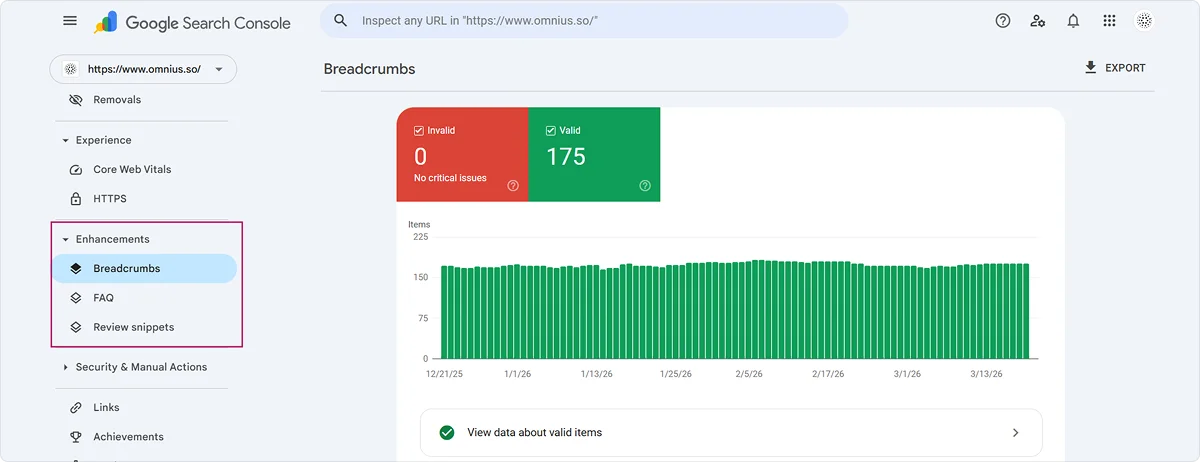
If your pages have schema issues, they will show up there with details on what needs to be fixed, so it is worth checking regularly as you add or update structured data across your site.
Internal Links
Internal links are links between pages on your own website.
They serve two purposes:
- Internal links help users navigate your site, and
- Internal links tell Google which pages are important and how your content relates to each other.
For SaaS sites, internal linking is often neglected because most content effort goes into creation rather than structure.
The result is a blog full of orphan pages that Google rarely crawls and that never accumulate enough authority to rank.
How to Structure Internal Links for SaaS?
The most effective model for SaaS content is topic clusters, one strong pillar page covering a broad topic, supported by multiple cluster pages covering specific subtopics, all linking back to the pillar.
For example, a pillar page on "CRM Software" links to and from cluster pages on "CRM for Small Business," "CRM vs. Spreadsheets," and "How to Choose a CRM." This structure concentrates authority on the pillar page and signals to Google that you have comprehensive coverage of the topic.
Orphan Pages
An orphan page is a page with no internal links pointing to it. Google may still find it via the sitemap, but it will rarely be prioritized for crawling and will struggle to rank.
To find them, run a Screaming Frog crawl, export all URLs, then cross-reference with your sitemap. Any URL in the sitemap that has zero inlinks in Screaming Frog is an orphan.
The fix is to add contextually relevant internal links from related pages. If no relevant page exists to link from, that's a signal that the content may need to be consolidated or repositioned.
Practical Rules to Follow
Every new page you publish should have at least 4 internal links pointing to it from existing relevant pages.
Your highest-value pages, pricing, key feature pages, and pillar content should receive the most internal links from across the site.
Use descriptive anchor text: "learn how to set up automated workflows" is more useful to Google than "click here."
Where it's natural and relevant, link from your blog to your product pages; this passes authority from your content to the pages you actually want to convert traffic on.
Note: Here is the link to a great video on how to find internal linking opportunities using Screaming Frog; it’s worth checking.

XML Sitemaps
An XML sitemap is a file that lists all the important URLs on your site and tells search engines where to find them. Think of it as a map you hand directly to Google; it doesn't guarantee indexing, but it ensures Google knows your pages exist.
For SaaS sites that produce a steady stream of content across different page types, keeping your sitemap clean and accurate is more important than most teams realize. A sitemap full of broken, redirecting, or noindexed URLs sends a poor signal to Google and wastes crawl budget on pages that serve no SEO purpose.
Here are the 3 important things to keep in mind about XML sitemaps:
- The sitemap should only contain URLs that return a 200 status code. Monitor it regularly for any 3xx, 4xx, or 5xx URLs and clean them up as they appear. Ahrefs site audit can help in monitoring these changes.
- Keep it updated every time you publish new content, remove old pages, or make structural changes to your site.
- And make sure your sitemap is always submitted and verified inside Google Search Console, this is how Google discovers new content faster and how you get visibility into how many of your submitted URLs are actually being indexed.
Meta Tags
Meta tags are snippets of HTML in the head of your page that provide information about the page to search engines and browsers. They do not appear directly on the page, but they influence how your pages appear in search results.
Getting them right is one of the most underrated parts of technical SEO; great content that nobody clicks on is just as ineffective as content that does not rank.
Title Tags
The clickable headline that appears in Google search results. Keep it under 60 characters, include your primary keyword naturally, and add your brand name at the end where relevant. One clear and specific title always outperforms a cluttered one stuffed with keywords.
Meta Descriptions
A short summary of your page that appears below the title tag in search results. Keep it under 155 characters and treat it as a short ad for your page, summarize what it offers, and give the reader a reason to click.
Keep in mind that Google may sometimes generate its own meta description if it decides another snippet from your page is more relevant to the search query.
Open Graph Tags
Controls how your pages appear when shared on social media and messaging platforms. Without them, platforms will pull random images and text from your page. At minimum every page should have og:title, og:description, og:image, and og:url defined.
Monitoring CTR
Following length guidelines is just the starting point. The metric that actually matters is click-through rate. Track your CTR regularly inside Google Search Console under the Performance report. Pages with high impressions but low CTR are where improving the title tag or meta description will have the most immediate impact.
Response Codes
Response codes are the status codes a server returns when a browser or search engine bot requests a URL. They tell Google whether a page exists, has moved, or has an error. Response code issues can quietly drain crawl budget, dilute link equity, and cause important pages to disappear from the index.
Make sure your site has no internal links pointing to 3xx, 4xx, or 5xx URLs - every internal link should point directly to a live 200 page. If you have redirect loops, remove the existing redirects entirely and set a single clean 301 redirect to the correct destination. Any dead 4xx page that previously had traffic or backlinks should be redirected with a unique 301 to the most relevant live page on your site.
The Most Important Response Codes for SEO
- 200 means the page loaded successfully and is what every important page should return.
- 301 is a permanent redirect used when a page has moved to a new URL permanently. It passes link equity from the old URL to the new one and is the correct redirect to use in almost every situation.
- 302 is a temporary redirect and should only be used when the move is genuinely temporary. Google may not pass full link equity through a 302.
- 404 means the page was not found. Some 404s are expected, but a large number of them on URLs that previously had backlinks or internal links pointing to them is worth fixing.
- 410 tells Google the page is gone permanently, which helps Google remove it from the index faster than a standard 404.
- 503 means the server is temporarily unavailable. A persistent 503 can cause Google to drop pages from the index.
Redirect Chains and Redirect Loops
A redirect chain is when URL A redirects to URL B, which redirects to URL C. Each additional hop dilutes link equity and wastes crawl budget.
A redirect loop is when two or more URLs redirect to each other indefinitely, causing Googlebot to stop following them entirely.
Run a Screaming Frog crawl and go to the Response Codes tab, filtering by 3xx, 4xx, and 5xx to see all redirects and errors across your site.
Hreflang tags
Hreflang tags tell Google which language and regional version of a page to show to users in different locations. If your SaaS serves multiple countries or languages, hreflang is essential; without it, Google may show the wrong language version to the wrong audience.
Hreflang is necessary to separate pages for different languages or separate pages targeting the same language in different regions, for example, English for the US and English for the UK. If your site has only one language and one regional version, you do not need it.
Every language or regional version of a page must reference all other versions using hreflang tags, including itself. This is called a return tag, and if any version is missing, the whole implementation can break.
Common Hreflang Tag Mistakes
Here are some of the most common hreflang tag mistakes:
- The most frequent mistake is missing return tags.
- Another common issue is using incorrect language codes; hreflang uses ISO 639-1 language codes like en, de, and fr, combined with optional ISO 3166-1 regional codes like US, GB, and DE.
- Also, make sure every URL referenced in an hreflang tag returns a 200 status code and is indexable. Pointing hreflang to noindexed or redirecting pages will cause the implementation to fail.
How to Audit
In Screaming Frog, go to Directives and open the Hreflang tab to see all tags and errors across your site. Ahrefs Site Audit also has a dedicated hreflang report that surfaces missing return tags and incorrect language codes.
Page Speed
Page speed refers to how fast your pages load and become usable for a visitor. It is a confirmed Google ranking factor, but more importantly, it directly affects how many visitors stay on your page, convert, and come back. A slow SaaS marketing site loses potential customers before they even read a word.
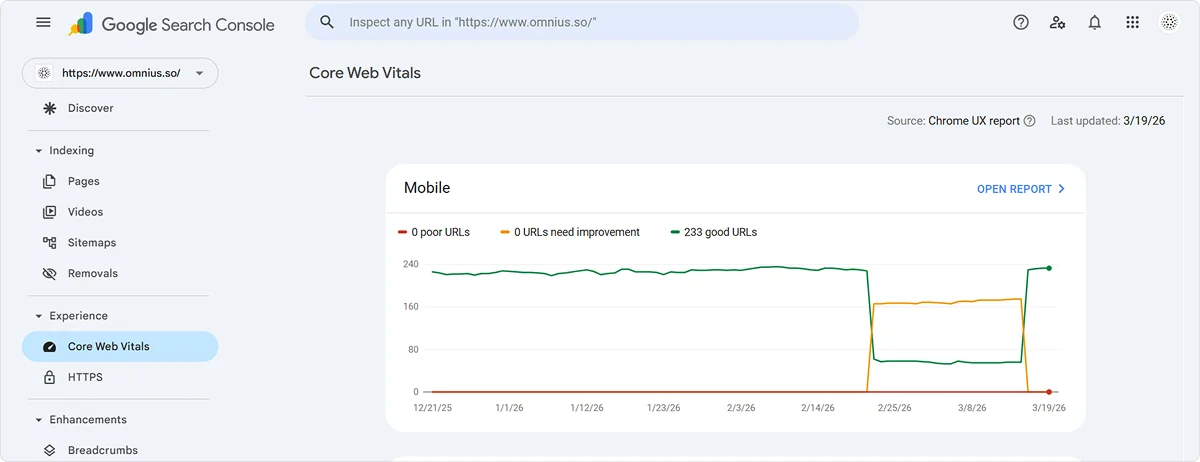
Core Web Vitals
Core Web Vitals are Google's official page experience metrics that feed directly into the ranking algorithm. There are three to know:
- LCP (Largest Contentful Paint) measures how long it takes for the largest visible element to load — under 2.5 seconds is good.
- INP (Interaction to Next Paint) measures how quickly the page responds when a user clicks or taps — under 200 milliseconds is good.
- CLS (Cumulative Layout Shift) measures how much the page layout shifts unexpectedly while loading — under 0.1 is good.
Common Issues on SaaS Sites
Large uncompressed images, render-blocking JavaScript, and too many third-party scripts are the most frequent causes of slow pages on SaaS sites. Chat widgets, analytics tools, heatmap tools, and A/B testing scripts all add up quickly and can significantly increase load time if not managed carefully.
How to Measure and Fix It
Use PageSpeed Insights to test individual URLs and pay attention to field data over lab data as it reflects real visitor experience.
In GSC, go to Experience and open the Core Web Vitals report for a site-wide overview. Quick wins include compressing images and converting them to WebP, deferring JavaScript that is not needed for the initial page render, and enabling browser caching.
Mobile Optimization
Google uses mobile-first indexing, which means it primarily uses the mobile version of your site to determine rankings, even for desktop searches. If your mobile experience is broken, slow, or missing content, your rankings will suffer across the board.
The risk for SaaS sites comes when content is hidden on mobile for design reasons, or when different templates serve different content to mobile and desktop users. The most common issues are clickable elements that are too close together, text that is too small to read without zooming, horizontal scrolling, and intrusive pop-ups that block the main content.
How to Test It
Use Google's Mobile-Friendly Test tool for a quick check on any URL. In GSC, go to Experience and open the Mobile Usability report to see all errors detected across your site. For a more realistic test, use Chrome DevTools and walk through your key pages as a first-time mobile visitor.
Best SaaS Technical SEO Tools to Use
Knowing what to fix is only half the battle. You also need the right technical tools to find issues efficiently and monitor them over time.
Here are the 5 tools we recommend for SaaS technical SEO audits.
1. Screaming Frog
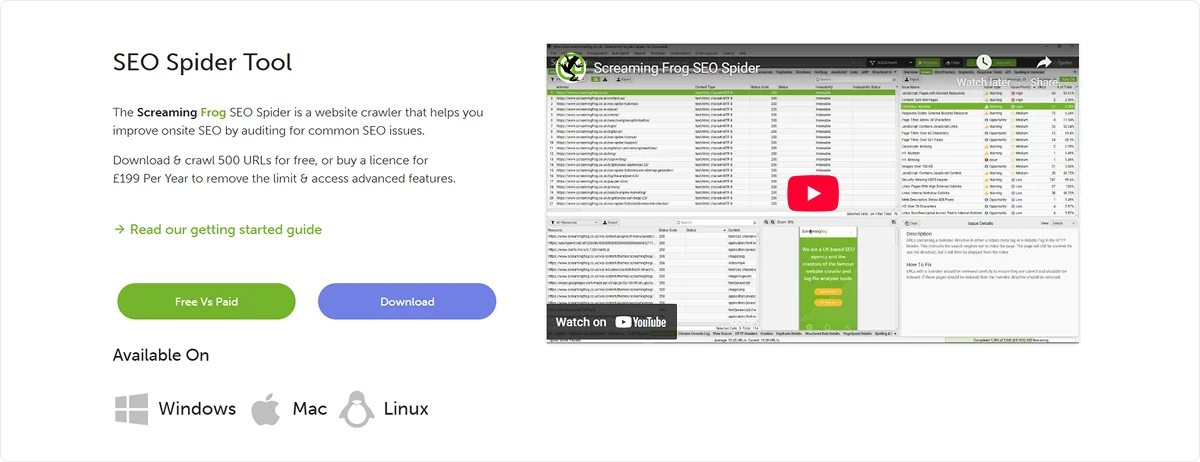
Screaming Frog SEO Spider is the industry standard website crawler used by SEO professionals and agencies worldwide. It crawls your entire site the way Google does and surfaces technical SEO issues across hundreds of data points, all from your desktop.
Key Features
- Crawls and audits broken links, redirects, and response codes
- Identifies duplicate content, missing meta tags, and thin pages
- Audits hreflang tags, canonical tags, and robots directives
- Renders JavaScript pages using Chromium to check what Google actually sees
- Integrates with Google Search Console, Google Analytics, and PageSpeed Insights
- Generates XML sitemaps and visualizes site architecture
- Schedules automated crawls and exports data to Google Sheets
Pricing
Free version available for up to 500 URLs. The paid licence costs £199 per year and removes the crawl limit while unlocking advanced features, including JavaScript rendering, API integrations, crawl scheduling, and crawl comparisons.
Best For
Technical SEO audits, site migrations, JavaScript rendering checks, duplicate content analysis, and ongoing site health monitoring. Essential for any SaaS team running regular technical SEO reviews.
2. Google Search Console (GSC)
Google Search Console is a free tool provided directly by Google that gives you visibility into how your site is performing in search. For technical SEO, it is the most important diagnostic tool available because the data comes straight from the source — Google itself.
Key Features
- The pages report shows which URLs are indexed, not indexed, and the reason why
- URL Inspection tool to check how Google crawls and renders any individual page
- Core Web Vitals report with real-world performance data segmented by mobile and desktop
- Mobile Usability report flagging pages with touch, layout, or content issues
- Coverage and enhancement reports for structured data errors and warnings
- Sitemap submission and indexing status monitoring
- Performance report with impressions, clicks, and CTR data by page and query
Pricing
Free. No paid tier. Available to any site owner who verifies ownership of their domain.
Best For
Monitoring indexing health, diagnosing crawl and rendering issues, tracking Core Web Vitals, and catching structured data errors. Should be the first place you check when investigating any technical SEO problem on your SaaS site.
3. Ahrefs
Ahrefs is a comprehensive SEO and marketing platform used by teams across the world to research keywords, analyze competitors, audit websites, and track rankings. For SaaS companies, it is one of the most practical all-in-one tools available for both strategic SEO work and technical auditing.
Key Features
- Site Audit tool that identifies technical SEO issues across your entire website
- Keywords Explorer for keyword research across 110 billion discovered keywords
- Site Explorer for competitor analysis, backlink research, and organic traffic insights
- Rank Tracker for monitoring keyword positions over time
- Content Explorer for finding top-performing content in any niche
- Brand Radar for tracking brand mentions and visibility across AI search and LLMs
- Integration with Google Search Console for combined performance insights
Pricing
Ahrefs offers a free version with limited access through Ahrefs Webmaster Tools. Paid plans start from a monthly subscription and scale up based on usage and team size, with an Enterprise plan available for larger organizations needing API access and custom reporting.
Best For
Keyword research, competitor analysis, backlink auditing, and ongoing technical SEO monitoring. Particularly useful for SaaS teams that want one platform covering both content strategy and technical health tracking.
4. Semrush
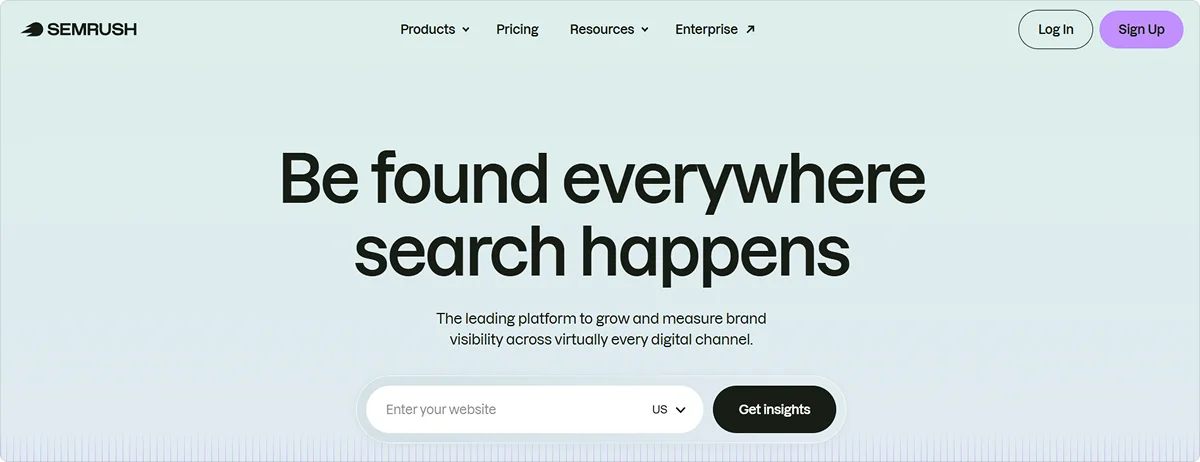
Semrush is an all-in-one digital marketing platform built for teams that want to manage SEO, content, advertising, and AI search visibility from a single place. With over 17 years of search intelligence behind it, it is one of the most data-rich platforms available for SaaS marketing teams.
Key Features
- Site Audit tool for identifying and fixing technical SEO issues
- Keyword research across a database of 27 billion keywords
- Backlink analysis with one of the largest link databases on the market
- AI Visibility tracking to monitor how your brand appears in LLM-generated answers
- Traffic and competitor analysis across any domain
- Content toolkit for creating SEO and AI-ready content
- Local SEO and social media management tools
Pricing
Semrush offers a free seven-day trial. Paid plans scale based on the number of projects, keywords to track, and team size. An Enterprise plan is available for larger organizations needing advanced AI visibility tracking, custom reporting, and deeper competitive intelligence.
Best For
SaaS teams that want an all-in-one platform covering technical SEO, keyword research, competitor monitoring, and AI search visibility. A strong alternative to Ahrefs for teams that also run paid advertising or need content and social tools in the same platform.
5. AtomicAGI
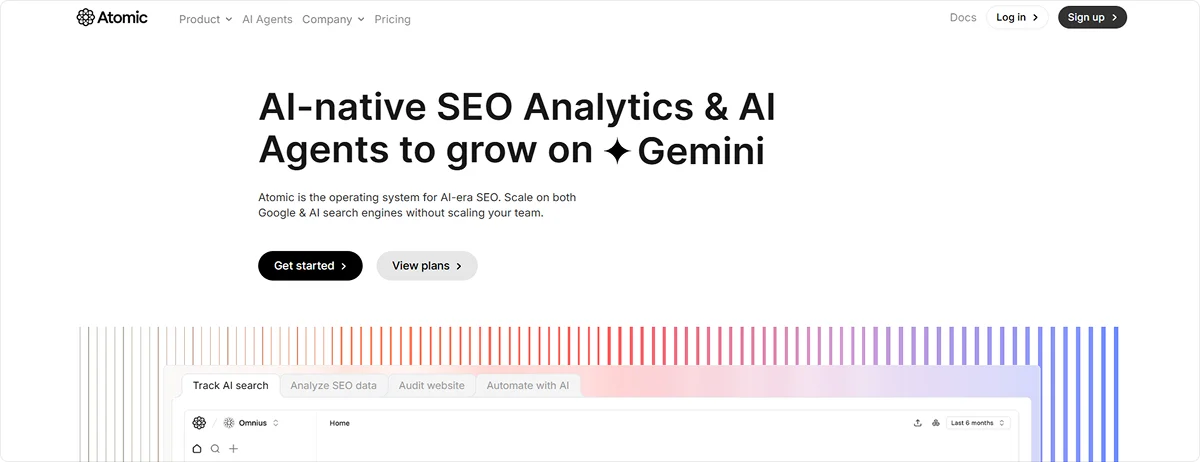
AtomicAGI is an AI-native SEO analytics platform built for teams that need to track and optimize for both traditional search and AI search engines in one place. It combines technical auditing, keyword and page analytics, AI visibility tracking, and workflow automation, making it particularly relevant for SaaS teams operating in the era of AI-powered search.
Key Features
- AI search visibility tracking across ChatGPT, Perplexity, Google Gemini, Claude, and more
- Technical SEO auditing covering Core Web Vitals, internal links, meta tags, sitemaps, and robots.txt
- LLM audit to check how AI crawlers access and interpret your site
- SEO analytics pulling data from Google Search Console and Google Analytics in one dashboard
- AI agents that automate tasks like content refreshment, keyword decay monitoring, and backlink discovery
- Real-time SEO opportunities flagged at a page level across your entire site
- URL indexing monitoring, and schema markup validation
Pricing
Atomic offers a free plan to get started. Paid plans scale based on usage and team size, with options for larger organizations needing advanced automation and multi-engine tracking.
Best For
SaaS teams that want to track both Google performance and AI search visibility from a single platform, without stitching together multiple tools. Especially useful for teams looking to automate SEO workflows and reduce manual reporting overhead.
Conclusion
Technical SEO is not a one-time task. It is an ongoing process that requires regular auditing, monitoring, and fixing as your SaaS site grows and evolves. Every new page you publish, every CMS update you push, and every product change you make can introduce new technical issues that silently hold back your rankings.
For SaaS companies, your marketing site is one of your most important acquisition channels. Technical issues that go unnoticed for months can silently cost you organic traffic and a pipeline that is hard to recover.
Start with crawlability and indexing, work your way through the areas covered in this article, and build a regular audit cadence. Treat technical SEO as a foundation you maintain, not a box you check once.
Contact Omnius if you need expert help from a technical SEO agency that works exclusively with SaaS companies. We will audit your site, identify what is holding you back, and help you fix it.
Frequently Asked Questions (FAQs)
Is technical SEO for SaaS hard?
It has a learning curve, but it is manageable with the right tools and a clear audit process. The biggest challenge is staying consistent as your site grows, since every new page or CMS update can introduce new issues. For most SaaS founders and marketing teams, the ongoing complexity makes it overwhelming to handle in-house, which is why it is typically outsourced to a technical SEO agency.
What is the difference between technical SEO and SEO?
SEO is the broader practice of improving your visibility in search, covering content, links, and structure. Technical SEO is specifically the foundation layer, ensuring search engines can crawl, render, and index your site correctly.
How much does technical SEO for SaaS cost?
It depends on whether you handle it in-house or hire an agency. Tools like Screaming Frog and Ahrefs cost a few hundred dollars per year. Agency engagements for a full audit and implementation typically range from $2,000 to $10,000+, depending on site complexity.


.png)

.svg)














.svg)






















.svg)