.png)


Bad SEO practices can seriously hurt your website's performance and visibility.
Unfortunately, many businesses unknowingly use these outdated or harmful tactics, leading to poor search engine rankings, low traffic, reduced credibility, and lost opportunities.
By understanding these practices, you can steer clear of them and focus on strategies that truly work.
This guide will walk you through:
- What bad SEO practices are,
- The most common mistakes to avoid,
- How these mistakes can damage your rankings,
- Actionable steps to correct course and optimize your site effectively.
We'll provide you with a roadmap to steer clear of SEO disasters and focus on techniques that bring results.
Key takeaways
- Bad SEO is rarely deliberate. Most of the damage we see in audits comes from outdated advice that used to work, not from anyone trying to cheat.
- Most "penalties" founders panic over aren't penalties. The real split is manual actions (a human flags you, notified in Search Console) versus algorithmic suppression (a quiet ranking drop, no notice, no appeal), and most traffic losses are the latter.
- Intent and output matter, not method. Practices sort into white, black, and gray hat, and even AI writing is fine, what Google targets is "scaled content abuse": high-volume pages with no real experience in them.
- The tactics most likely to trigger a manual action are link and deception schemes: paid links without rel="sponsored", PBNs, site reputation abuse, and cloaking, all of which SaaS teams often inherit from an old agency or a compromised plugin.
- Recovery starts with diagnosis. Match the symptom to the cause (sitewide drop plus notice = manual action, slow decline = algorithmic or content decay, one URL bouncing = cannibalization), then audit every 1 to 3 months.
What are bad SEO practices?
Bad SEO practices refer to outdated, unethical, or poorly executed strategies that hinder rather than help your website's performance on search engines.
These practices often stem from:
- Misunderstanding Google’s guidelines,
- Trying to game the system with “black hat” unethical SEO practices,
- Cutting corners to achieve quick wins instead of sustainable growth.
You'll hear these tactics sorted into three buckets:
- White hat SEO is anything that works with search engine guidelines. Better content, faster pages, links you earned.
- Black hat SEO is anything designed to manipulate rankings in ways search engines explicitly prohibit. Cloaking, hidden text, buying links.
- Gray hat SEO sits in between. Not banned outright, but built on a loophole that usually closes. Today's clever workaround is next year's spam policy update.
Google publishes what falls into the black hat bucket in its spam policies. It is worth reading once a year. Most of the practices below map to something in that document.
These practices fail to boost your visibility and can lead to penalties from search engines.

A well-optimized site should focus on providing value to users while adhering to search engine guidelines.
Key takeaway: Understanding bad SEO is the first step toward avoiding it.
For more insights, check out this article on SEO best practices.
Why is avoiding bad SEO practices crucial for your site?
Avoiding bad SEO practices is essential for maintaining and improving your website's performance.
When you engage in these harmful tactics, you risk being penalized by search engines like Google.
This can lead to a drop in your site's ranking, making it harder for potential customers to find you.
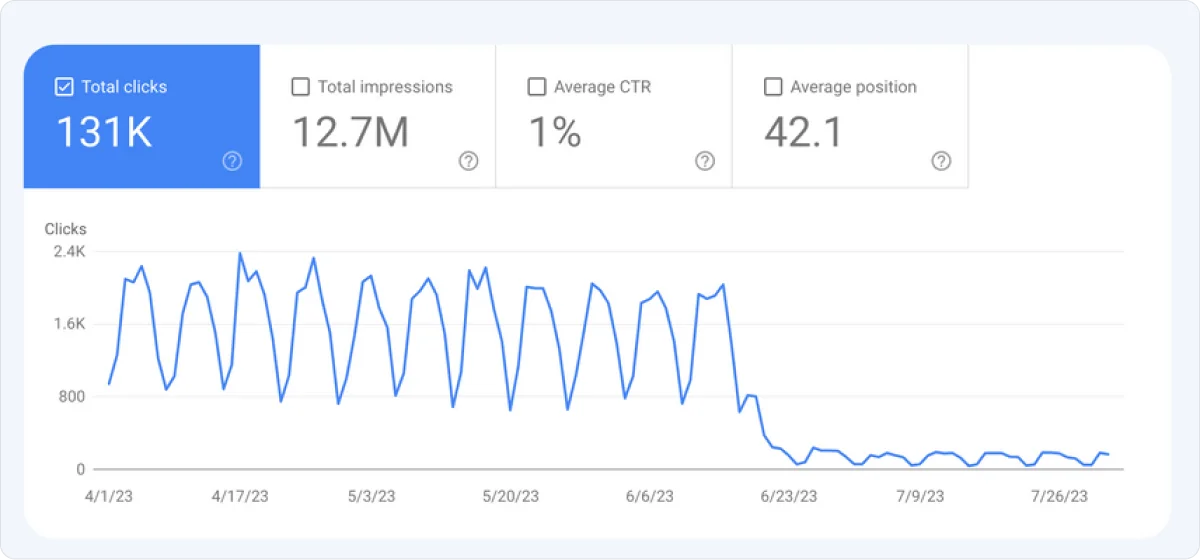
Moreover, bad practices can damage your site's reputation.
Users may perceive your content as untrustworthy if it seems spammy or manipulative.
Instead, focusing on ethical SEO techniques helps build your domain authority and fosters trust with your audience.
Remember, high-quality content and a good user experience are key to long-term growth in SEO.
Let’s cover the most common bad SEO practices to help you identify them and avoid them successfully in the future.
What actually happens when Google catches bad SEO
The word "penalty" gets used loosely, and that vagueness is why founders panic over the wrong things. There are two very different outcomes, and knowing which one you're dealing with changes your entire recovery plan.
Manual actions are exactly what they sound like. A human reviewer at Google looked at your site, decided it violated the spam policies, and applied a restriction. You get notified in Google Search Console under Security & Manual Actions. The affected pages or the whole domain can drop out of results. You fix the issue, submit a reconsideration request, and wait for a human to review it again.
Algorithmic suppression is the quieter and far more common outcome. No notification, no message in Search Console, no one to appeal to. An algorithm update reassessed your pages and decided they no longer deserve their positions. Traffic slides over days or weeks. You find out from your analytics, not from Google.
Here's the part most teams get wrong: the vast majority of traffic drops we investigate are algorithmic, not manual. Teams burn weeks hunting for a penalty that was never applied, when the actual problem is that a competitor published something better and Google agreed.
1. Keyword stuffing
Keyword stuffing is the practice of excessively using a specific keyword or phrase in your content, often to manipulate search engine rankings.
Overloading your content with keywords unnaturally makes your content unreadable and harms user experience.
This SEO practice is usually done by inexperienced writers or webmasters who aren’t close to SEO.
They’ve just heard that they need to have “some” keywords within pages related to their business, and that’s what they do-they push the wrong button massively.

Example:
"Our best CRM software is the best CRM software for small businesses because this best CRM software increases productivity in your business."
See how unnatural it sounds?
Search engines have become smarter and can easily recognize when content is stuffed with keywords.
Instead of helping your rankings, this tactic can lead to penalties.

To learn more about effective keyword use, check out this guide on keyword research.
It might have worked in 2008, but today, it's a no-go.
Solution
1. Focus on semantic SEO - Use synonyms and related terms naturally.
You can type ChatGPT SEO prompts to generate semantically similar keywords for the one you need.

2. Aim for user intent by answering their questions rather than forcing keywords.
3. Write naturally, prioritizing readability. Tools like Atomic AGI or SurferSEO can help optimize without overloading.
The goal is to focus on creating high-quality content that naturally incorporates keywords.
This not only improves readability but also enhances your chances of ranking higher.
2. Over-optimized anchor text
Anchor text plays a vital role in your SEO strategy by providing context and relevance to the linked content.
It is the clickable text in a hyperlink, and using descriptive anchor text helps search engines understand what the target page is about.
One prevalent error is over-optimizing anchor text by using exact-match keywords excessively.
This can come off as spammy and may lead to penalties from search engines.
No one naturally clicks on "best CRM software" every time, right?
Including anchor texts like that is like keyword stuffing.
Google will notice that you’re forcing one keyword for which you want to rank your article, which can only harm its performance.
Don’t do that.
Also, if you link to a page about "best email marketing tools" using the phrase "click here," it gives no context.
Solution
Instead, aim for a natural mix of branded, generic, and descriptive anchor text.
See how the second anchor text below does not use the main keyword, but you can still figure out what it is about.

For example, using "best email marketing tools" as the anchor text clearly indicates what users can expect when they click the link.
Here are some anchor text best practices to implement:
- Diversify anchor text with variations like “CRM tools,” “read our CRM guide,” or even branded names.
- Use descriptive phrases when appropriate, e.g., “learn how this CRM improves productivity.”
- Ensure anchor text flows naturally within the sentence.
- Only link where it’s relevant, and make it clear where you’re linking to.
- Don’t force to stuff anchor text with keywords
Properly optimized anchor text can improve your site's search engine rankings and enhance user experience.
By including relevant keywords in your anchor text, you signal to search engines that your content is related to those terms.
3. Chasing low-quality links or building at scale
Don't waste time with link farms or cheap domains.
When it comes to backlinks, quality matters more than quantity.
It is better to have a few solid links from reputable sites than 1,000 junk ones.
Low-quality and irrelevant links can now only harm your website, as Google sees them as irrelevant.
Example: A backlink from a directory that lists random, irrelevant sites or a blog known for paid link schemes.
Solution
Identify the greatest authorities within your niche and make sure you only strive for backlinks at their site.
There are different strategies you can implement to get the backlink:
1. Broken links - Identify broken links on relevant industry websites, then offer your content as a replacement. This approach provides value to the site owner while earning you a backlink.
Tip: Use tools like Ahrefs, IPLocation, or Screaming Frog to find broken links quickly.
2. Resource Page Outreach - Many websites maintain resource pages linking to helpful tools, guides, or services. Reach out to include your resource if it aligns with their content.
Tip: Ensure your content is truly valuable and not overly promotional.
3. Competitor Backlink Analysis - Use tools like SEMrush or Ahrefs to analyze your competitors’ backlinks. Target similar sources to pitch your content or services.
Tip: Focus on replicating links from authority sites rather than pursuing every link.
4. Engage in Forums and Communities - Contribute genuinely helpful answers on forums like Reddit or niche community platforms, linking to your resources where appropriate.
Tip: Avoid spammy practices; provide value before seeking a link.
By focusing on value-driven strategies and building relationships, you can generate high-quality backlinks that boost SEO authority and organic traffic.
Note: You can access Lemlist’s proven email templates hub depending on your use case and send them for better results.

4. Obsessing over DR/DA
It's a vanity metric!
DR (Domain Rating, an Ahrefs metric) and DA (Domain Authority, a Moz metric) are third-party scores. Neither is used by Google. Both are estimates built by companies that do not have access to Google's index.
A high DR or DA tells you nothing about whether that site's pages actually rank, get organic traffic, or send you visitors who convert.
Look at page quality, relevance, and whether users actually stick around on the page.
It doesn’t matter if your DR is lower than 10 if it generates qualified leads and sales, right?
Also, if DR=90 site links back to you, but sends an irrelevant audience, then there’s no any benefit from its strong authority.
Search engines no longer value backlinks from irrelevant websites and may even penalize you for this.
Solution
Here are some ways to avoid this issue:
- Evaluate the relevance of the linking site to your audience.
- Prioritize backlinks from pages with actual organic traffic and audience alignment.
- Focus on contextual links from reputable sources and websites from your niche.
The true value of backlinks lies not in raw numerical metrics but in their contextual relevance and thematic alignment.
A link is most beneficial when it comes from a website that shares similar subject matter and uses anchor text that accurately reflects and complements your page's content.
5. Publishing irrelevant and low-quality content
Flooding your site with content isn't a win if it's not high-quality or relevant.
Google is too smart for that now.
For example, a blog that discusses unrelated topics like “pet care tips” and “crypto investing” under the same domain.
Those kinds of posts can seriously damage your website’s reputation and SEO performance.
On the other hand, when you publish content that lacks depth or relevance, it can deter readers and lead to high bounce rates.
Low-quality content is a content that:
- Isn’t fully original and unique in some way
- Doesn’t answer the search intent (what the users are looking for specifically within that query they searched for)
- Isn’t properly formatted and is hard to read
- Has grammatical and spelling errors
- Lacks E-E-A-T (Experience, Expertise, Authoritativeness, Trustworthiness)
Search engines interpret these as signs that your site doesn’t offer valuable and consistent information, which can negatively impact your rankings.
Prioritizing high-quality content in your content strategy is crucial for protecting your brand and improving your overall SEO efforts.
Solution
Search engines prioritize sites that consistently deliver quality content because it enhances user experience.
To make sure you produce high-quality content, it needs to satisfy these conditions:
- Accurate and relevant
- Satisfying search intent
- Readable
- Grammatically correct
- Credible and useful, having E-E-A-T
Here are some steps to implement to come to the high-quality content:
1. Create a content plan centered around your niche.
2. Use topic clusters: Create pillar pages (broad topics) and link them to detailed subtopics.
3. Leverage tools like SEMrush or Ahrefs to identify relevant topics with search potential.
High-quality content is essential for establishing credibility and authority in your niche.
Creating valuable, informative, and engaging content attracts more visitors and encourages them to share your work.
This boosts your site's traffic and improves your search engine rankings.
For tips on creating great content, check out our guide on writing content that converts combined with our content writing checklist.
6. Publishing AI content at scale without adding expertise
Let's be direct about this, because there's a lot of noise around it.
Using AI to write is not a violation. Google has been clear that it rewards quality content regardless of how it was produced.
What Google's spam policies actually target is scaled content abuse: generating large volumes of pages primarily to manipulate rankings, without adding real value. The tool isn't the problem. The intent and the output are.
The failure mode we see most in SaaS is not somebody cynically spamming. It's a founder or a lean content team using AI to hit a publishing cadence, shipping forty posts a quarter that are competent, readable, and completely interchangeable with what forty other companies published. Nothing is wrong with any single post. Nothing is memorable either.
That output has a specific weakness: it has no experience in it. No customer conversation, no number from your own product, no opinion anyone could disagree with. And experience is the one input a language model cannot generate, because it does not have any.
This matters more now than it did two years ago. When answers get synthesized by ChatGPT, Perplexity, or AI Overviews, the content that gets pulled in is the content that says something the model could not have produced on its own. Generic AI content is the least likely thing to be cited, because it is the most redundant thing in the index.
Solution
How to use AI without producing forgettable content
The fix is not using less AI. It is deciding what only you can supply, and refusing to publish without it. Four habits that hold the line:
- Put a non-negotiable in front of every post: one thing in here must be ours. A number from your product data, a pattern from your support tickets, a position your founder actually holds.
- Use AI where it's genuinely strong. Research synthesis, outlining, first drafts of structural sections, editing for clarity. Not for the argument itself.
- Have a named human review and sign the post. Author bios with real credentials are not decoration. They are the trust signal.
- Watch publishing velocity against quality. If your output doubled and your average time on page fell, you've scaled the wrong variable.
7. Ignoring user experience
If your site is slow and has slow-loading images or pop-ups blocking content on mobile devices, it will probably cause a bad user experience.

For example, a page with a high bounce rate signals poor relevance or UX, it is something you should definitely take care of since search engines interpret it as a signal of poor user experience.
Sites that load quickly, respond promptly, and offer smooth navigation are rewarded with better visibility in search results.
To achieve this, you must focus on more than just attractive design-you need to optimize technical performance.
Don't just optimize for search engines - make sure people actually like being on your website.
How to achieve this?
Solution
To enhance web performance, take these practical steps:
- Optimize for speed - Use tools like Google PageSpeed Insights to optimize your website speed.
- Ensure mobile-friendliness - Test responsiveness with Google’s Mobile-Friendly Test and prioritize content readability over complex, resource-heavy design.
- Optimize media on website - Compress all images and videos to reduce file sizes (you can use TinyPNG for this, and we suggest using WebP format).
On the other hand, to improve your pages and UX, here are some advice:
- Track metrics in Google Analytics or Hotjar.
- Optimize content, navigation, and CTAs to reduce bounce rates.
- A/B test elements like headlines, layouts, or images.
8. Duplicate and cannibalized content across pages
Posting the same thing across multiple pages can hurt more than help.
Also, copying content from other sites or using the same text across your pages confuses search engines and reduces your chances of ranking.
It can only bring you a penalty from Google and nothing good.

Duplicate content can split your link equity, meaning that backlinks pointing to various versions of the same content won't strengthen any single page.
This can hinder your site's overall authority.
For example, publishing the same product description across 10 different feature pages on your website can confuse search engines and make them see your pages as cannibalized content.
Content cannibalization occurs when multiple pages on a website target the same or very similar keywords and topics.
This leads to competition between your pages in search engine rankings.
Instead of boosting your SEO, this internal competition can dilute the authority of your content and confuse search engines about which page to prioritize.

To avoid these issues, focus on creating unique and original content that targets one specific main keyword only once (targeting one keyword with more than one page won’t benefit you) and provides real value to your audience.
Solution
Here are a few solutions to this problem:
- Create unique, tailored content for each page. If you want to rank high, aim for relevance.
- Implement canonical tags if content duplication is unavoidable.
- Rewrite page descriptions or add user-generated content like reviews to make your pages unique and specific.
- Ensure you permanently redirect duplicate pages with 301 redirects to the main version to avoid splitting link equity and confusing search engines.
- Prevent indexing of duplicate content - Use meta tags like <meta name="robots" content="noindex, follow"> on duplicate or low-value pages, such as search results or filtered pages.
- Merge duplicate or highly similar content into a single, comprehensive page that provides value. It’s better to have one highly valuable page than two average ones.
9. "Set and forget" SEO
Many businesses treat SEO as a one-time task: they optimize a page or blog post, publish it, and assume the results will sustain indefinitely.
This “set and forget” mindset is a mistake because SEO is dynamic, influenced by changing algorithms, competitor activity, and shifting user behavior.
Without ongoing effort, your rankings and traffic will likely decline over time.
The cost of standing still is higher now than it was two years ago, because Google is no longer the only thing reading your pages. ChatGPT, Perplexity, and AI Overviews assemble answers from sources they judge current and credible. A page with 2021 pricing, a tool that shut down, or a statistic nobody cites anymore is not just ranking lower. It is quietly dropping out of the answers being generated about your category, and unlike a ranking drop, you will not see that happen in Search Console.
So updating content is now doing double duty: holding your position in traditional search, and keeping you eligible to be cited in AI search.
Why "Set and Forget" Fails:
- Search Algorithm Updates - Google regularly updates its algorithms to improve the search experience. These updates can reward fresh content and penalize outdated or thin pages.
- Evolving User Intent - Search intent can shift as industry trends, technologies, or customer preferences change. A blog answering questions relevant three years ago(e.g., "remote work tools" from 2018) may no longer meet user needs.
- Competitor Activity - Competitors continuously create and optimize content to outrank others. If you’re stagnant, you’re giving them an edge. For example, when a competitor updates their “best CRM software” list annually while yours remains static.
- Content Decay - Over time, even high-performing pages lose traffic as they become outdated or less relevant. This is known as content decay.
Solutions to Avoid "Set and Forget" SEO
Here are a few effective ways on how to improve the performance of existing content:
1. Regular Content Updates
- Update stats, tools, and examples in evergreen content.
- Add new insights, FAQs, or sections based on user feedback.
- Monitor top-performing pages in Google Analytics and Google Search Console and refresh them periodically.
2. Perform SEO Audits Every 1-3 Months
- Identify underperforming pages and optimize them.
- Remove or redirect outdated content that no longer serves a purpose.
- Use tools like SEMrush or Ahrefs to analyze keyword performance and opportunities.
3. Monitor Trends and Keywords
- Use Google Trends, AnswerThePublic, and keyword research tools to track changes.
- Revise your content’s focus to incorporate trending or newly relevant terms.
- Add long-tail keywords to capture niche audiences.
4. Competitor Benchmarking
- Analyze competitor content using tools like BuzzSumo or SimilarWeb.
- Identify gaps in your content where competitors are excelling.
Example in Practice
Scenario: A SaaS blog post on “Top Collaboration Tools for Teams” from 2019.
- Issue: Outdated tools are listed, newer competitors aren't mentioned, and the ranking has dropped.
- Solution:
- Refresh the list with trending tools from 2024.
- Add comparisons, pros/cons, and user reviews.
- Optimize with updated keywords like “Best Collaboration Tools for Hybrid Teams in 2025.”
By transitioning to a proactive SEO approach, you can ensure long-term growth to stay ahead of competitors, and maintain relevance for your audience.
Here’s our content audit guide to help you identify opportunities and optimize your content for maximum performance.
It helped us create hundreds of graphs like this:

Here’s another example:

If you need help creating stable SEO growth or recovering your traffic, don’t hesitate to contact us and see how we can help.
10. Ignoring mobile optimization
Mobile optimization is crucial in today’s digital world because more people access websites through their smartphones than ever before.
If your site isn’t optimized for mobile devices, you risk losing a significant portion of your audience.

On the other hand, Google has made it clear that they see mobile-friendliness as an important ranking factor.
A well-optimized mobile site provides a smooth user experience, ensuring your content is easily readable and navigable on smaller screens.
With most web traffic coming from mobile devices, a non-responsive website can lead to higher bounce rates and lower rankings.
Additionally, you might miss out on valuable traffic and potential customers without proper mobile optimization.
Studies show that many users prefer shopping or browsing on their phones.
If they encounter a poorly designed site, they may turn to competitors instead.
Prioritizing mobile optimization is essential for maintaining your audience and improving your overall SEO strategy.
So, how do you do it?
Solution
Here are a few solutions to take into consideration when you start optimizing your website for mobile users:
- Use responsive design - Ensure the site adapts seamlessly to different devices.
- Optimize for touch navigation with larger buttons and clear layouts.
- Test frequently using mobile emulators or tools like BrowserStack.
You can also test your website performance on mobile devices using PageSpeed Insights.

It will give you specific suggestions for improving your performance and speeding up your website.
We recommend you implement each of those suggestions, as it will help you boost your website performance.
11. Following generic SEO advice without testing
Not every SEO tip is for everyone.
Following tips for ecommerce SEO when you run a SaaS website is something you should definitely not do.
It is something that can bring you problems.
What works for one niche might tank for another.
So, you should be careful when it comes to choosing the advice you’re following.
Solution
Here are some tips to solve this:
- Test strategies with small experiments before scaling.
- Track the impact of changes using tools like Google Search Console.
- Tailor approaches to your niche, audience, and goals.
12. Buying links, renting PBNs, and selling your domain's reputation
Section 3 covered chasing low-quality links. This one covers the tactics people reach for when they get impatient, and all three carry real risk of a manual action rather than a slow decline.
Paid links. Exchanging money or goods for a link that passes ranking signals is a direct violation of Google's link spam policies. Not illegal, to be clear, and not rare either. But the sponsored placement priced at $400 with "dofollow guaranteed" is exactly the pattern link spam systems are built to detect. If a link is paid, it should carry a rel="sponsored" attribute. Publishers who resist adding it are telling you what they're selling.
Private Blog Networks. A PBN is a set of sites, usually built on expired domains with leftover authority, that exist only to link to clients. They work until the network gets identified, and then every site linked from it absorbs the consequences at once. You have no control over that timing and no way to remove the links quickly.
Site reputation abuse. This is the newest of the three and the most relevant to anyone with a strong domain. It's the practice of hosting third-party content on an authoritative site purely to borrow that site's ranking strength. Think coupon subdirectories on news domains. Google introduced a specific policy targeting it, and enforcement has been aggressive.
For SaaS and Fintech companies, the version of this that matters is the inbound pitch: someone offers to pay for a subdirectory, a "resource hub," or a partner section on your domain. It looks like easy revenue. What you are actually selling is the trust your domain took years to build, and the policy exists precisely to make that trade unprofitable.
What to do instead
- Audit your backlink profile quarterly and know how every link you have was acquired. If you inherited an agency's link building, assume nothing.
- Insist on rel="sponsored" for anything paid. If a publisher won't, the placement was never worth buying.
- Decline subdirectory rental offers, no matter how the deal is framed.
- Earn links with assets people cite: original data, industry benchmarks, tools. Slower, and the only version that compounds.
13. Hidden Text and Links
Hidden text and links refer to content that is deliberately concealed from users but visible to search engines.
This can include text that matches a webpage's background color or links placed off-screen.
For example, if a website has white text on a white background, users cannot see it, but search engines can still read it.
This tactic is often used in an attempt to manipulate search engine rankings by stuffing keywords without affecting user experience.
However, these practices are considered deceptive and fall under black hat SEO techniques.
Why they should be avoided
Using hidden text and links should be avoided for several reasons:
- First, search engines like Google actively penalize sites that engage in deceptive practices. If caught, your site could face severe penalties, including a drop in rankings or complete removal from search results.
- Moreover, hidden content undermines user trust. If visitors discover that you’re trying to manipulate their experience, they may leave your site and never return.
Building a reputation based on transparency and integrity is essential for long-term SEO success.
Instead of using hidden text, focus on creating valuable content that naturally incorporates your keywords and user experience that your visitors will love.
14. Cloaking and deceptive redirects
Cloaking means showing search engines one version of a page and showing people a different one. The crawler sees a keyword-rich article. The visitor lands on something else entirely.
It shows up in a few forms:
- Content cloaking - serving text to Googlebot that human visitors never see.
- Sneaky redirects - a page that ranks legitimately but bounces mobile visitors to an unrelated offer.
- User-agent cloaking - detecting the crawler by its user-agent string and serving it different HTML.
Google names cloaking explicitly in its spam policies. It is one of the tactics most likely to result in a manual action rather than a quiet ranking drop, because deception is easy for a human reviewer to confirm.
Here's why this belongs in a post aimed at SaaS and Fintech teams, who are not usually the ones doing this on purpose: cloaking is something you can inherit. A previous agency set it up. A growth contractor installed a redirect script three years ago and left. A compromised plugin is serving pharmaceutical spam to Googlebot while your site looks completely normal in a browser. We have found all three during audits of sites whose owners had no idea.
How to check whether you have a cloaking problem
- Use the URL Inspection tool in Google Search Console and read the rendered HTML. If it doesn't match what you see in a browser, you have an answer.
- Fetch key pages with Googlebot's user-agent and compare against a normal request.
- Audit every redirect rule on the site and confirm you know why each one exists.
- Check for unexplained scripts and injected markup, especially after any CMS or plugin update.
15. Not properly optimizing the URLs
A poorly optimized URL structure can hinder a website’s search engine optimization (SEO) and user experience.
I see this issue among businesses daily, which either overlook URL structures during website creation or fail to revisit and improve them as their website grows.
Unoptimized URLs can lead to several problems, including:
- Poor Readability - Complex, lengthy, or random URLs make it difficult for users and search engines to understand the page's content.
- Low Keyword Relevance - URLs that lack targeted keywords miss opportunities to signal relevance to search engines for specific queries.
- Difficulty in Navigation - A disorganized URL structure can make it harder for users to navigate or guess related pages on a site.
- Missed Branding Opportunities - URLs are often shared on social media, in emails, or on printed materials. A messy URL can appear unprofessional or untrustworthy.
So what’s the difference between a bad URL and a good URL example:

How do you make sure you prevent this?
Here are the steps that will help you from now on.
Solution
Here are the steps to help you overcome the non-optimized URLs and make sure they’re always SEO-friendly:
1. Use Clear, Descriptive URLs - Ensure URLs accurately describe the page's content and avoid using vague terms like "page1.html". Instead, use descriptive keywords.
Example: Change www.example.com/article?id=789 to www.example.com/seo-tips-for-beginners
2. Keep URLs Short and Simple - Avoid unnecessary words, numbers, or special characters, and use hyphens (-) to separate words for better readability and indexing
Note: You can include numbers within the articles, such as reports or statistics, or any other page where the year is important to include.
3. Incorporate Target Keywords - Include primary keywords relevant to the page content, but avoid keyword stuffing.
Example: Instead of www.example.com/services/123, use www.example.com/services/seo-audit
4. Implement a Logical URL Hierarchy - Organize URLs to reflect the site’s structure, ensuring categories and subcategories are intuitive.
Example: For an SEO agency site: www.example.com/services/saas/content-writing instead of www.example.com/1245-xyz
5. Avoid Dynamic Parameters When Possible - Use static URLs instead of dynamic ones with query strings (e.g., ?product_id=12345). If dynamic parameters are necessary, implement canonical tags to avoid duplicate content issues.
6. Ensure URLs are Case-Insensitive - Redirect uppercase URLs to their lowercase counterparts to prevent duplicate content.
Example: Redirect www.example.com/About to www.example.com/about
7. Implement 301 Redirects for Old or Changed URLs - Redirect outdated or changed URLs to the new versions to maintain SEO value and avoid 404 errors.
16. Ignoring Algorithm Updates
Staying updated with algorithm updates is essential for maintaining your website's visibility and performance in search engine results.
Search engines like Google frequently update their algorithms to improve user experience and provide more relevant search results.
If you ignore these changes, your site may become outdated, leading to a decline in rankings and traffic.
Moreover, understanding algorithm updates helps you identify what strategies are effective and which ones may lead to penalties.

For instance, updates may prioritize high-quality content or mobile optimization, making it crucial to align your SEO strategy accordingly.
Solution
Adapting to algorithm updates involves several proactive steps.
First, regularly review your website’s performance metrics to identify any sudden drops in traffic or rankings.
This can help you pinpoint issues that may arise from recent updates.
To stay informed, follow our website for the latest updates and insights.
Additionally, consider conducting regular audits of your content to ensure it meets current standards for quality and relevance.
By being proactive and flexible, you can navigate algorithm changes effectively and maintain a strong online presence.
17. Overlooking Long-Tail Keywords
Long-tail keywords are specific phrases that usually consist of three or more words.
They are less competitive than shorter, more generic keywords but often lead to higher conversion rates.
For example, instead of targeting "email tool," a long-tail keyword would be "best email marketing tools for newsletter."
Using long-tail keywords is essential because they cater to users who are further along in the buying process and know exactly what they want.
These are so-called high-intent keywords.
By focusing on these specific phrases, you can attract more qualified traffic to your site.
This targeted approach not only improves your search engine rankings but also enhances user satisfaction.
To dive deeper into this topic, check out this guide on long-tail keyword strategies.
Solution
To effectively use long-tail keywords in your SEO strategy, start by conducting thorough keyword research.
Use tools like Google Keyword Planner or Ahrefs to identify relevant long-tail keywords in your niche.

Once you have a list, incorporate these keywords naturally into your content, including headings, subheadings, and meta descriptions.
Additionally, create high-quality content that addresses the specific needs and questions of your audience.
This could involve writing detailed blog posts, guides, or FAQs that provide valuable information.
By continually optimizing your approach, you can enhance your site's visibility and attract more engaged visitors.
How to Identify and Fix Bad SEO Practices?
Here’s a simple framework for identifying and addressing bad SEO:
Step 1: Conduct an SEO Audit
To conduct an SEO audit, use tools like Google Search Console or Ahrefs to identify issues such as broken links, duplicate content, or keyword stuffing.
Match the symptom to the cause
Step 2: Prioritize Fixes
Start with the practices that have the most significant impact, like improving site speed or eliminating duplicate content.
Rank the rest on two axes: how much damage the issue is doing right now, and how fast the fix pays off. Anything that can trigger a manual action goes first, regardless of effort, because the downside is uncapped. Next come the fixes that are cheap and compound, like consolidating cannibalized pages or correcting internal links. Deep structural work such as a URL migration or a full content rewrite is usually worth doing, but it belongs later in the sequence, since it is slow, risky, and hard to isolate if something else breaks at the same time.
Step 3: Follow SEO Best Practices
- Focus on creating high-quality, original content.
- Build organic backlinks through outreach and valuable content.
- Optimize your site for mobile and speed.
Step 4: Monitor Performance
Use analytics tools to track changes in rankings, traffic, and user behavior after making improvements.
Two things worth watching separately: what Google does with your pages, and what AI search engines do with them. Search Console and your analytics platform cover the first. The second is newer territory, and AI visibility trackers such as Atomic AGI exist to fill that gap, showing whether a fix moved your citations in ChatGPT and Perplexity rather than just your rankings.
Whatever you use, set a baseline before you start fixing things. Without one you are guessing at whether anything improved.
Conclusion
Improving your SEO strategy requires a commitment to ethical practices and focusing on quality content.
By avoiding bad SEO examples, you can enhance your site's credibility and visibility in search results.
Remember to stay informed about industry trends, continuously monitor your performance, and adapt to changes in search engine algorithms.
Prioritizing high-quality content and user experience will ultimately lead to greater benefits in your SEO efforts.
Need help?
Contact us, and let’s discuss how you can create a high-quality SEO strategy and content to attract qualified leads to your website!
FAQ
Which action is a bad SEO practice?
Engaging in black hat SEO techniques is a prime example of a bad SEO practice that should be avoided. These tactics aim to manipulate search engine rankings through unethical means, such as cloaking or buying links. Such actions can result in severe penalties and damage your site's reputation. It's always best to stick to ethical strategies that focus on quality and user experience.
What are some common SEO mistakes?
Some common SEO mistakes include neglecting long-tail keywords, relying on paid links, and not monitoring bounce rates. These oversights can prevent your site from reaching its full potential. For instance, overlooking long-tail keywords means missing out on targeted traffic that is more likely to convert. To avoid these pitfalls, regularly review your SEO strategy and stay updated on best practices.
Which SEO should be avoided?
Any form of SEO that involves deception or manipulation should be avoided. This includes practices like using hidden text and links or engaging in low-quality guest posting. Such tactics can lead to penalties from search engines, harming your visibility and credibility. Instead, focus on creating high-quality content and building genuine relationships within your niche. For more insights, check out our guide on ethical SEO practices.
How often should you audit for bad SEO practices?
A full technical and content audit every one to six months catches most structural problems before they compound. Between audits, monitoring matters more than auditing: watch Search Console for indexing changes and manual actions, track your top pages for traffic decay, and review your backlink profile quarterly so inherited link building does not surprise you. If you want a repeatable process, our SEO audit guide walks through it step by step.
Can bad SEO get your site removed from Google entirely?
Yes, though it is uncommon and usually reserved for severe, deliberate spam. The more typical outcome is a partial manual action affecting specific pages, or algorithmic suppression where rankings fall with no notification at all. Check Search Console under Security & Manual Actions. If nothing is listed there, you are dealing with an algorithmic issue, and fixing it means improving the pages rather than appealing a decision.
How long does it take to recover from a Google penalty?
It depends entirely on which kind you have. A manual action requires fixing the violation and submitting a reconsideration request, which a human reviews. Algorithmic suppression has no appeal process. You improve the affected content and wait for Google to recrawl and reassess, which can take multiple crawl cycles. Anyone quoting you a fixed recovery timeline before diagnosing which type you have is guessing.


.png)

.svg)
















.svg)



























.svg)