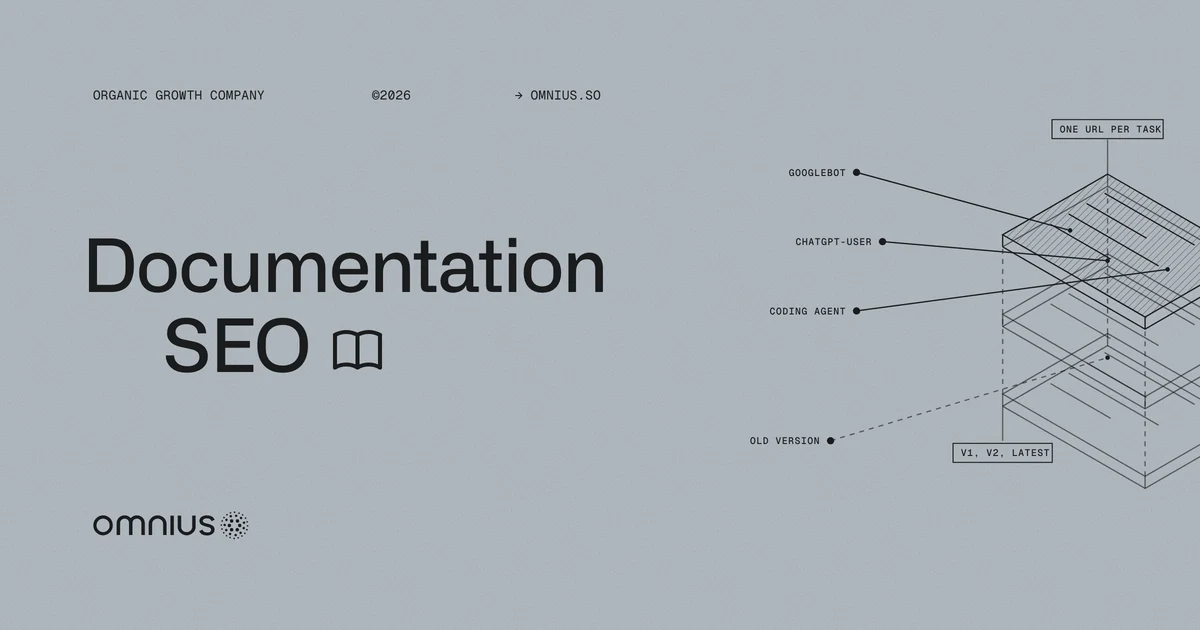
Documentation SEO is the work that gets a product's docs pages found and quoted by Google, AI answer engines, and coding agents. ChatGPT, Claude, Claude Code, and Cursor reach docs with a developer's error message or a question about an endpoint. Unlike Google, most of them need the answer in what the server sends.
Agents made up nearly 40% of Stripe's documentation traffic by June 2026, Stripe reported.
When an answer engine or coding agent retrieves setup instructions, the docs supply the facts and code. This guide shows how each reader reaches a page, the four problems that hide documentation, the order of fixes, and how to measure reach.
Key takeaways
- Google, answer engines, and coding agents reach docs by different routes, from search indexes to live fetches.
- A browser-built API reference returns an empty shell to the live fetchers behind ChatGPT and Claude and to most coding agents.
- Old versions and preview copies compete with the current page, so each task needs one indexable URL per supported version.
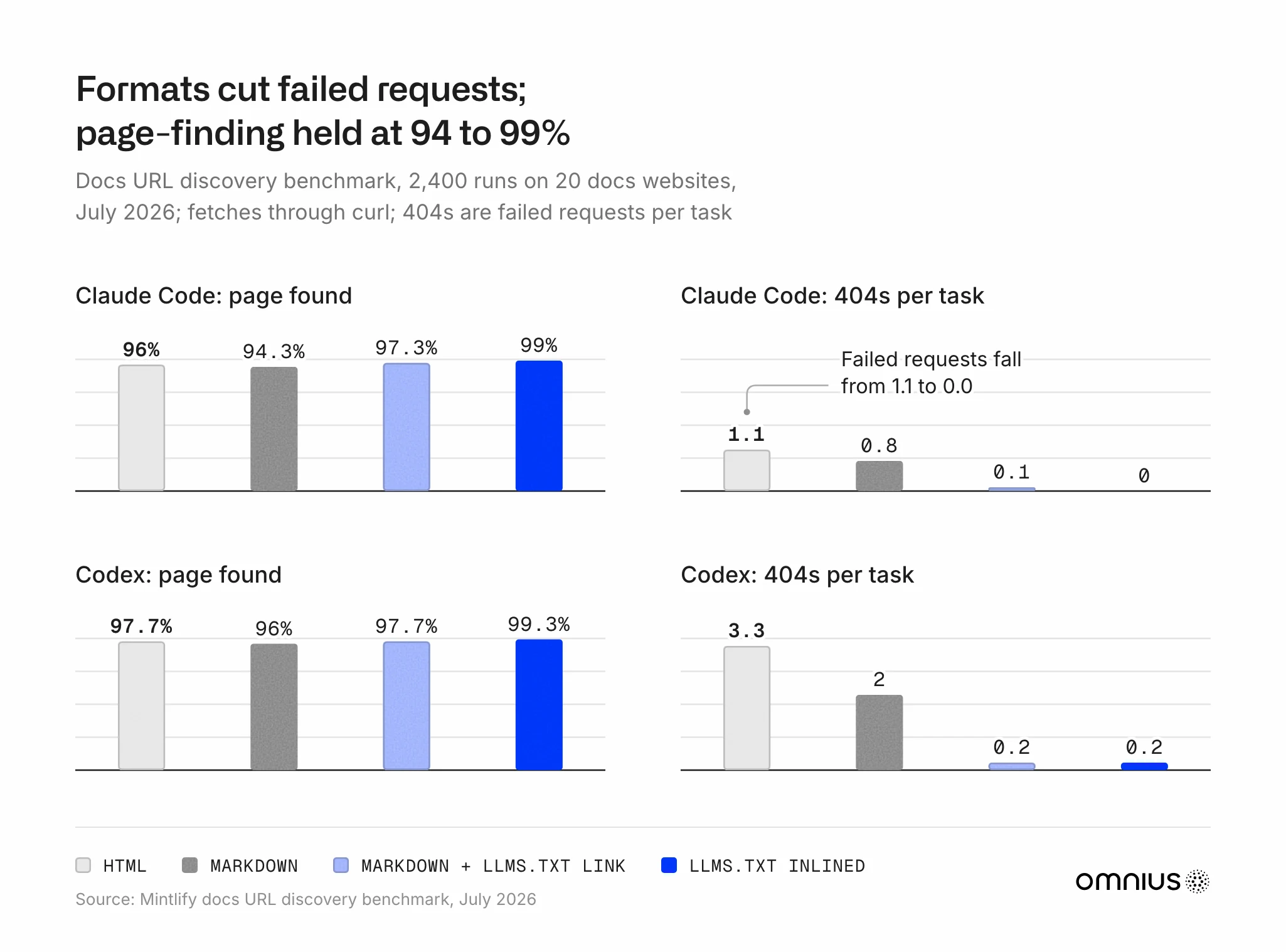
- Markdown copies and index files cut agents' failed requests, while agents found the right page about as often in every format in Mintlify's tests.
- Most agents skip JavaScript analytics, so server logs, Search Console, and Bing's AI report measure docs reach.
What documentation SEO is, and why docs now have three readers
Documentation SEO covers the quickstarts, guides, API references, error pages, and integration pages a company publishes for people building on its product. It differs from marketing-page SEO because queries name a task or an error, versions duplicate pages, and reference pages come from a spec.
On docs hosted by Mintlify, agents now make up most of the measured traffic. Their share rose from 20.8% in February 2026 to 66% in August, according to the State of Knowledge report, partly because Mintlify began counting more agents in June.

Docs pages supplied 394 of 844 answers built on a fetched page, more than any other page type, so docs shape what agents tell developers. Vercel and the ora.ai lab traced them in 1,033 agent runs on 25 websites, June to August 2026.
Three changes in 2026 affect documentation SEO:
- June 15, 2026: Google added a note that llms.txt index files neither help nor harm visibility in Google Search.
- August 5, 2026: Cursor's staff wrote, "The Cursor agent is quite good at discovering the right docs by itself," confirming that version 3.14.2 removed its @Docs index.
- August 31, 2026: Google opened its generative AI controls and reports in Search Console to all websites worldwide.
How Google, ChatGPT, and coding agents reach a docs page
Google, ChatGPT, and coding agents each find a URL and read a copy of the page. Google renders JavaScript, while ChatGPT's live fetcher and most coding agents read only the server response.
Googlebot finds docs through links and sitemaps, renders their JavaScript, and keeps one canonical URL, the copy it shows in search results. AI Overviews and AI Mode draw on Google's index, and a website must leave its generative AI setting on in Search Console to appear in them.
ChatGPT search, Claude, and Perplexity use search crawlers such as OAI-SearchBot to build an index, while Copilot answers from Bing's index. User fetchers such as ChatGPT-User and Claude-User read pages live when an answer needs them, and both skip JavaScript. Our guide to JavaScript SEO for AI search covers rendering engine by engine.
Coding agents find docs through web search or a docs index file, and some guess the path. A docs Model Context Protocol (MCP) server lets agents search the docs directly.
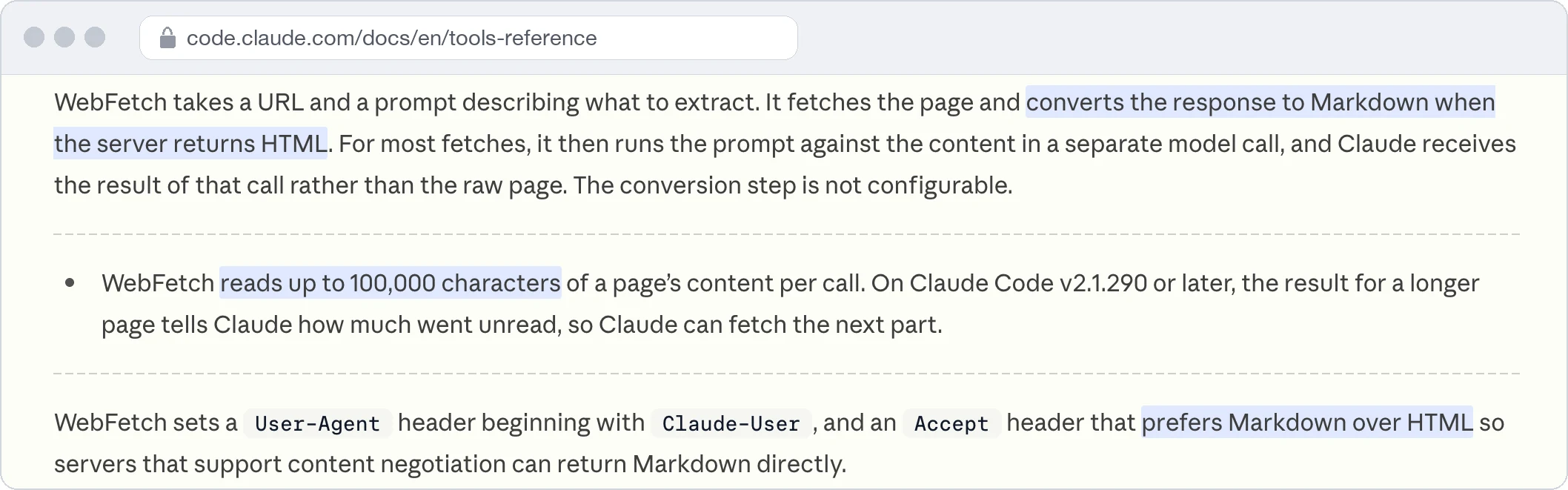
Claude Code's WebFetch tool asks for Markdown and reads up to 100,000 characters per call. Seven of nine coding agents fetched without running JavaScript in Oleksii Borysenko's preprint tests from February to March 2026.
Do coding agents fetch the API reference before running code? Not in most runs: Codex did in all three runs and Claude Code and Cursor in none of theirs in GitBook's nine-session test in April 2026, though all nine finished the task.
| Reader | How it finds the page | What it reads | What stops it | Names in server logs |
|---|---|---|---|---|
| Links, sitemaps | Rendered HTML | Duplicates, login walls | Googlebot | |
| Answer engines | Indexes, live fetches | Server HTML or Markdown on live fetches | 403 blocks, browser-built pages | OAI-SearchBot, ChatGPT-User, Claude-SearchBot, Claude-User, PerplexityBot, Bingbot |
| Coding agents | Search, llms.txt, MCP, guessed paths | Markdown or converted HTML | Empty pages, page size | Claude-User or generic browser agents |
For instance, a developer integrating an API's v2 asks how to verify a webhook signature. We check for a title that names the task, steps that reach ChatGPT's fetcher, and code labeled for v2 when Claude Code fetches it.
What hides documentation pages from search engines and AI agents
Four problems hide docs pages: empty server responses, competing old versions, titles that don't state the task, and weak links into the docs.
1. A server response with no text in it. Swagger UI, an open-source viewer for API documentation, builds the reference in the browser from the OpenAPI file that describes the API. Redoc's default embed works the same way. Swagger UI's public demo sent 1,258 bytes to a request with Claude Code's user agent on November 19, 2026, and its only text was the title.
Dachary Carey wrote in the Agent-Friendly Documentation Spec that a browser-built page "is not a truncation problem. It is a zero-content problem." Google can render it, but most coding agents can't. A bot rule that sends agents a 403 error is worse, because it also blocked the JavaScript-running client in Vercel's probes.

What to do:
1. Build the reference to static HTML at deploy, with one URL per endpoint group, pages sized for an agent's fetch limit, and the OpenAPI file linked from the page.
2. Keep public docs public, and allow the crawlers and fetchers in the table above through robots rules and the content delivery network (CDN).
3. Check the logs for 403 responses to each bot on docs paths, since blocking ClaudeBot doesn't stop Claude-User.
2. Old versions, previews, and stale pages competing with the current one. Google shows one copy of duplicate and near-duplicate pages and treats a canonical tag as a strong signal. Which copy wins without one? Google picks the copy it judges best, which can be an old version with more links. We treat a supported version with different parameters as its own page, as Docusaurus does, with a banner on older versions.
What to do: Point duplicates to the current page and noindex retired ones, since a robots block doesn't keep a URL out of Google. Keep previews behind a login, update pages in the release that changes the product, and redirect moved URLs.
3. Titles, headings, and code that do not state the task. Developers search for the error or parameter they're stuck on, so a page titled Overview leaves less to match. Stripe's webhooks page opens its Markdown version with a title about receiving events at a webhook endpoint and a first sentence that states the job.
Lines in 73 of 119 answers with code matched a fetched page word for word in Vercel and Ora's runs, so an outdated sample can reach a developer as written.
What to do: Name the task, parameter, error, or integration in each title tag and subheading, and answer it in the first two sentences. Label each code block with its language and SDK version.
4. Weak internal links and navigation into the docs. Google finds pages through HTML links and sitemaps, so a page that only the search box can reach may never be fetched. A pricing page that lists API rate limits can link to the docs page that defines them.
What to do: Link the docs from product, pricing, and integration pages with HTML links, and submit the docs sitemap in Google Search Console and Bing Webmaster Tools.
How to optimize documentation for search engines, LLMs, and coding agents
We fix the server response before titles and add agent outputs last, because a page that can't be fetched gains nothing from better wording. The six steps each have a done-when check:
- Map pages to tasks. List each page's job and the queries it should answer; done when every top page has one task.
- Check the server response. View the source of one page per template, the API reference first; done when each template's text is in the HTML.
- Settle versions. Set canonicals, labels, and redirects; done when URL Inspection in Search Console confirms our canonical for each task and supported version.
- Rewrite titles and openings. Start with the pages that earn the most Search Console impressions; done when each names its task.
- Link and submit. Link docs from product pages and submit the sitemaps; done when no page is orphaned.
- Turn on agent outputs. Enable Markdown pages, an index file, and an MCP server; done when each one serves the current page.
Three of the five platforms below ship step 6, according to their documentation in November 2026. Plugins and settings change the output, so we check the live docs.
| Platform | Server HTML | llms.txt | Markdown pages | MCP server |
|---|---|---|---|---|
| Mintlify | Yes, our check | Automatic | Automatic | Automatic |
| GitBook | Yes, documented | Automatic | Automatic | Automatic |
| ReadMe | Yes, our check | On by default | By request header | Toggle; docs tools paid |
| Docusaurus | Yes, documented | Not built in | Not built in | Not documented |
| Read the Docs | Yes, our check | Opt-in | By request header | Not documented |
Where does llms.txt fit, then? We add an index file and Markdown copies once the HTML works, because they save wasted fetches.
In Mintlify's 2,400-run benchmark in July 2026, agents found the expected page 94% to 99% of the time in every format. On average, failed requests per task fell from 2.23 with HTML to 0.11 with Markdown and a linked index file. Most HTML failures were requests for a missing Markdown copy or index file.
How to measure documentation SEO when agents skip analytics
Agents that don't run JavaScript never fire the analytics tag, so Google Analytics misses them. We measure docs reach with Search Console, Bing, logs, and a prompt check:
| Signal | What it shows | What it misses | How often |
|---|---|---|---|
| Search Console | Performance queries, generative AI impressions | AI feature queries and clicks | Weekly |
| Bing Webmaster Tools | Copilot citations, sampled queries | Rankings | Monthly |
| Server or CDN logs | Markdown requests, IP-verified fetchers | Which generic clients are agents | Weekly |
| Prompt check | Pages ChatGPT and Claude cite | Variation between runs | Monthly |
Which log lines show an agent? We count Markdown requests separately from IP-verified fetchers, since user agents can be copied and some agents look like browsers. For example, machine routes carried 83% of Mintlify's classified agent traffic in August 2026, though a Markdown request alone doesn't prove an agent sent it.
The prompt check records the model, date, cited URL, and whether the answer names the current version. Our guide to agent experience covers task panels that test whether agents use a product correctly.
How we approach documentation SEO at Omnius
We treat docs as the place where a developer product's facts get confirmed. Our working model is that coding agents such as Claude Code draw on training and the project's setup before reading docs. The docs then have to confirm that choice.
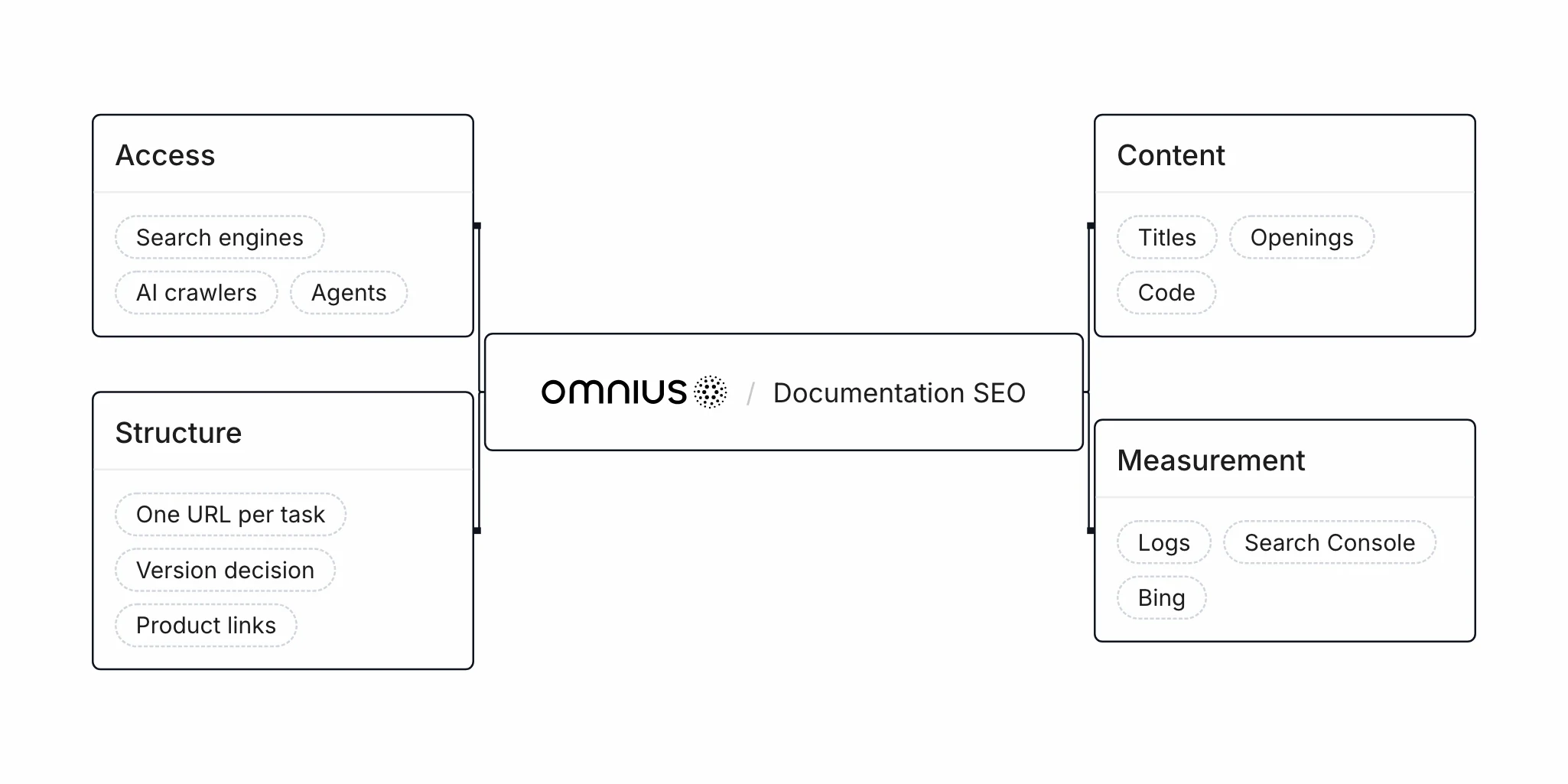
Our work covers how companies are discovered, understood, evaluated, or selected through search, and we find docs one of its most underused areas. We work on them in four parts:
- Access: What search engines, AI crawlers, agents, and retrieval systems receive from every docs template, checked with our technology
- Structure: One URL per task and supported version, and product links into the docs
- Content: Titles, openings, and code that state the task and match the current product
- Measurement: Logs, Search Console, Bing, and repeated setup questions, measured as deltas against the Day-0 baseline
See how we run technical SEO for B2B software.
FAQ
Should docs live on a subdomain or a subfolder?
Docs can live on a subdomain or a subfolder, whichever is easier to manage. "From an indexing and ranking perspective, Google doesn't have a preference," its crawling FAQ says, and Stripe's docs live on docs.stripe.com.
Does llms.txt help docs rank or get cited?
llms.txt doesn't help docs rank or get cited in Google, which says the file neither helps nor harms visibility. Ahrefs found that 97% of about 38,000 such files got no requests in May 2026. The file's measured gain is fewer failed agent requests.
Should documentation teams optimize for Google or for ChatGPT?
Documentation teams should do the base work first, because crawlable, current, task-named pages serve both. The agent mix differs by platform. ChatGPT made up 54% of classified agent traffic on GitBook in the week of April 27, 2026, while Claude Code and Cursor led on Mintlify in March. Each team's own logs decide what comes next.
Does writing docs for AI agents make them harder for people to use?
Docs written for agents don't have to be harder for people to use, because clear titles, current code, and fetchable text serve both. Google requires no special writing or markup for its AI features, and agents in Vercel and Ora's runs read the same docs pages people do.
Methodology
This guide rests on platform documentation, published tests, platform data, and read-only requests to public pages. On November 19, 2026, we fetched Swagger UI's demo with Claude Code's user agent, Stripe's webhooks page as Markdown, and the raw HTML of each docs platform's own documentation. Omnius sells SEO and AI search services. Mintlify and GitBook sell docs platforms and report on docs they host; Vercel and Ora traced agent harnesses, not public answer engines, on 25 websites. Mintlify's share mixes agent requests with human page loads, and its agent count widened on June 8, 2026.
Sources
The sources below are grouped by publisher.
- Google: AI features guide, Crawling and indexing FAQ, JavaScript SEO basics, Search documentation updates, New controls for website owners
- Microsoft, OpenAI, and Anthropic: Bing AI performance report, OpenAI crawlers, Anthropic's crawlers, Web fetch tool
- Docs platforms: Mintlify SEO, GitBook SEO, GitBook LLM-ready docs, ReadMe llms.txt, ReadMe MCP, Mintlify traffic analytics, Docusaurus SEO, Read the Docs canonical URLs, Swagger UI, Redoc
- Data and tests: Mintlify docs traffic, Vercel and Ora study, GitBook AI docs data, GitBook coding agents test, Agent signatures preprint, OpenAI bots log study, Agent-Friendly Documentation Spec, Cursor @Docs removal