.png)

An XML sitemap is a file that maps your website's URLs, metadata, and structure for search engine and AI crawlers. A well-configured sitemap improves visibility by enabling search engines to discover and index content more quickly.
Despite being standard for over 20 years, sitemaps are still overlooked. SE Ranking found that nearly 15% of websites didn’t have a sitemap in 2025, while those that did often had poorly written ones.
In this guide, we’ll explain why this can be an issue. You’ll learn:
- What an XML sitemap is
- What elements it contains
- Why it’s crucial for SEO
- How to create a sitemap
Key Takeaways
- An XML sitemap is a text file that tells crawlers what's on your website. It lists your URLs along with metadata like last updates, language versions, and media, and helps bots understand your site's structure before they crawl it.
- A well-configured sitemap is important for SEO and AI search visibility. It preserves crawl budget, speeds up indexing, and supports specialized search results. Without one, crawlers may miss key content or waste resources on inefficient crawling.
- Sitemaps follow the Sitemaps 0.90 protocol and use standardized XML tags. Mandatory tags like <url> and <loc> define the file's structure, while optional tags like <lastmod> and extensions provide crawlers with richer context about your content.
- You can create a sitemap through your CMS, third-party tools, or manually. Regardless of the method, validate the file using Google Search Console before publishing, then place it in your root directory and reference it in your robots.txt file.
- Follow formatting standards and best practices. Use full URLs, avoid duplicates and redirects, close all tags properly, and update your sitemap regularly to reflect changes on your site.
What Is an XML Sitemap?
An XML sitemap is a text file that lists your website’s pages and content. Search engine and AI bots use the sitemap as a guide when crawling your website. You can use the sitemap to specify what’s important on your website and provide additional data for pages and media, which helps content surface in specialized search results:
Importance of a Sitemap: Do You Really Need One?
Having an XML sitemap is not mandatory, but for any site that depends on organic traffic, it's hard to justify not having one.
Crawlers process billions of pages daily. While they can discover your website through internal and external links, a sitemap makes the process more efficient.
Here’s why having an XML sitemap is important:
- Saves the crawl budget: Bots have a limited amount of resources they can dedicate to your website—this is your crawl budget. By making it easier to find and understand content, you help preserve resources.
- Speeds up indexing: Crawlers discover new pages and updates sooner, which matters for blogs, stores, and other websites with frequent changes. Several sources claim sitemaps lead to 47% faster indexing rates and 23% more organic traffic.
- Surfaces orphan pages: Pages that don’t have internal links that direct to them (orphan pages) can be hard to get to. A sitemap ensures bots can still discover them. Still, internal linking remains necessary to pass authority.
- Provides metadata: The additional data you include in a sitemap helps crawlers better understand, crawl, and index your content. For example, if they notice a new date in <lastmod>, bots will know to recrawl it.
- Supports multiregional sites: If your website serves multiple languages or regions, hreflang annotations in your sitemap help search engines display the correct version based on the visitor's location.
- Helps with specialized search: You can create sitemap extensions for specific content, such as videos, images, and news. These sitemaps and their metadata help bots index and display content in specialized results pages.
Simple websites with fewer than 500 pages and a comprehensive linking system can function without a sitemap. However, large websites with complex navigation, limited linking, and frequent updates need a sitemap to make key content reachable.
Sitemap.xml and Robots.txt
A sitemap works in tandem with your robots.txt file, which instructs bots on which content they should and shouldn’t access. It’s a standard practice to link to your sitemap within the robots.txt file. Not having one or either of these files could result in server overload as multiple bots try to crawl your entire site at once.
When both files are configured correctly, search engines and AI crawlers can index your content efficiently and surface updates faster. They’re part of baseline infrastructure. Without them, even strong content can get lost in the crawl.
What Does an XML Sitemap Look Like?
XML sitemaps use Extensible Markup Language (XML) and conform to the standardized schema defined by the Sitemaps 0.90 protocol. This format is supported by all major search engines, such as Google and Yahoo.
As per the protocol, XML sitemap files must be under 50 MB and contain no more than 50,000 URLs. Websites that exceed these limits require more than one sitemap.
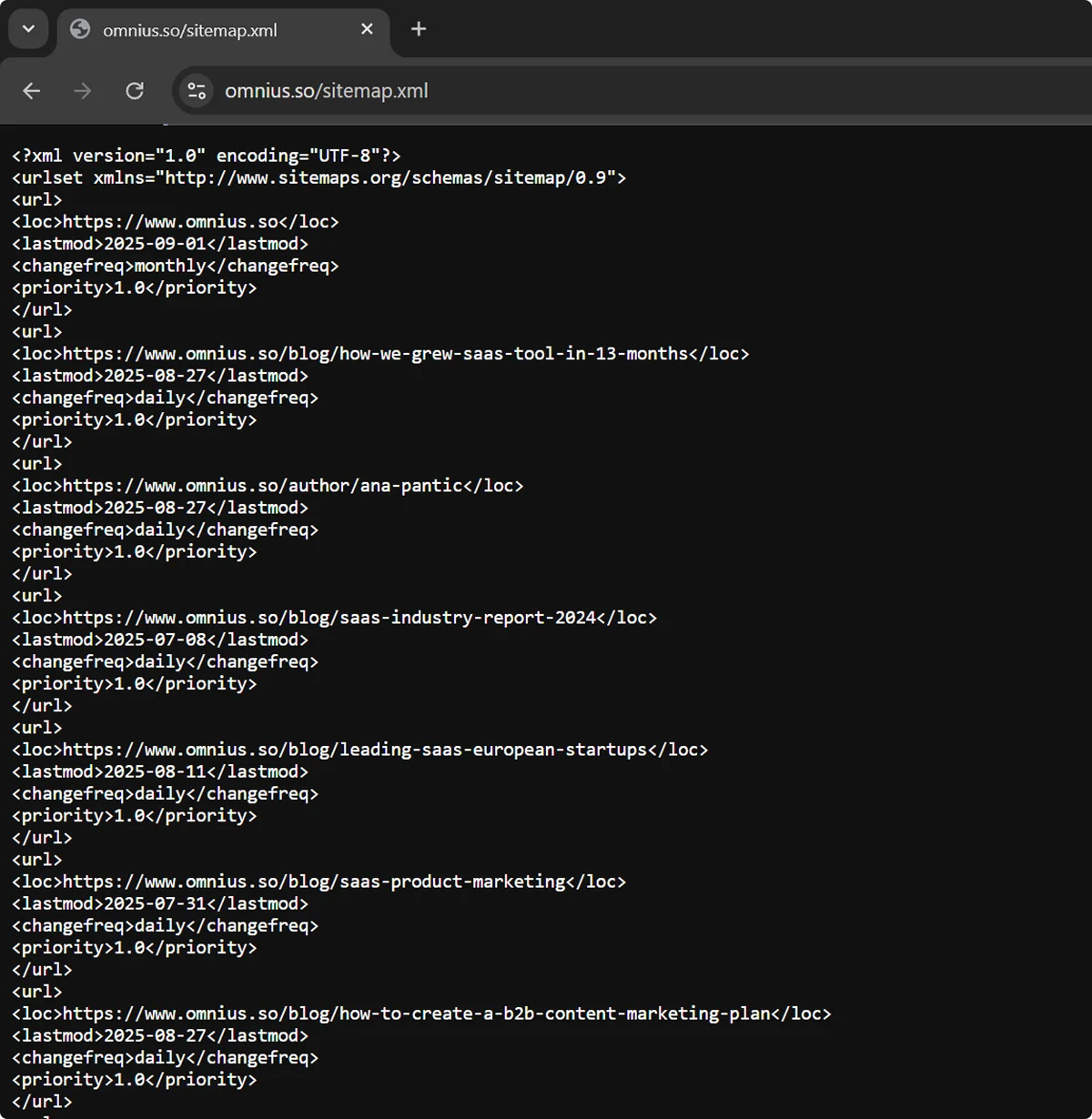
Namespace Declarations
As you can see in the above screenshot, an XML sitemap starts with the technical specifications:
<?xml version="1.0" encoding="UTF-8"?>
<urlset xmlns="http://www.sitemaps.org/schemas/sitemap/0.9">
In this case, the specifications define the sitemap version (1.0), encoding system (UTF-8), and namespace declaration (xmlns), which specifies the protocol.
Additional declarations can signal the presence of media content or alternate language versions, which we’ll cover later.
Other Elements and Tags in an XML Sitemap
Sitemaps use tags to label and organize data, some of which are mandatory as per the 0.90 protocol:
*Keep in mind that some crawlers may not follow all tags, or may treat them as suggestions. For example, Googlebot ignores the <priority> and <changefreq> tags entirely.
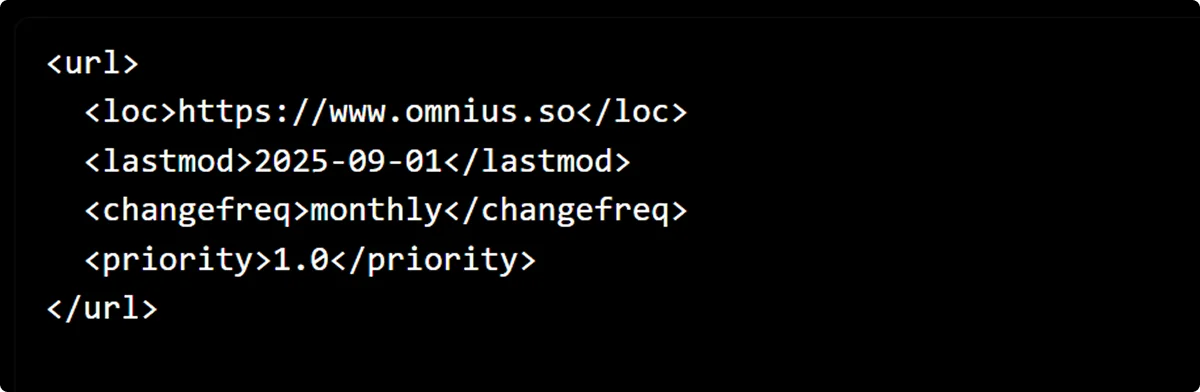
Each tag has an opening version, which comes before the data, and a closing version that comes afterward and contains a slash (/). Files start with a <urlset> tag and end with a </urlset> tag after all the URLs and attributes have been listed. Similarly, URL entities begin and end with <url> and </url>, respectively.
Here’s an example of a full URL entry for Omnius’s homepage:
XML sitemaps also have to use entity-escape codes (UTF-8) for content between tags. For example, < should become < and > should become > so that parsers can easily differentiate between tags and content.
Sitemap Extensions for Regional Content
If you have alternative versions of pages aimed at different regions or languages, include them as extensions in your sitemap.
To do so, you first need to add a namespace declaration at the beginning of a sitemap and after the main protocol tag. The W3C namespace is standard across the web:
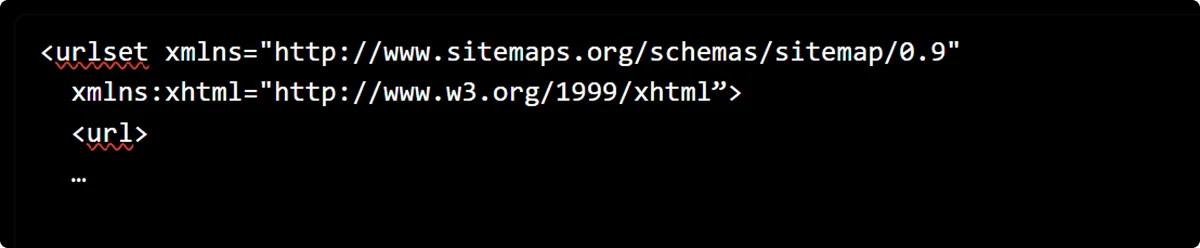
XML Tags for Regional Content
The next step is to add specific namespace tags, hreflang tags, and language/country codes in the appropriate pages’ URL entries. These should come after the mandatory and optional XML tags. Here’s what that might look like:
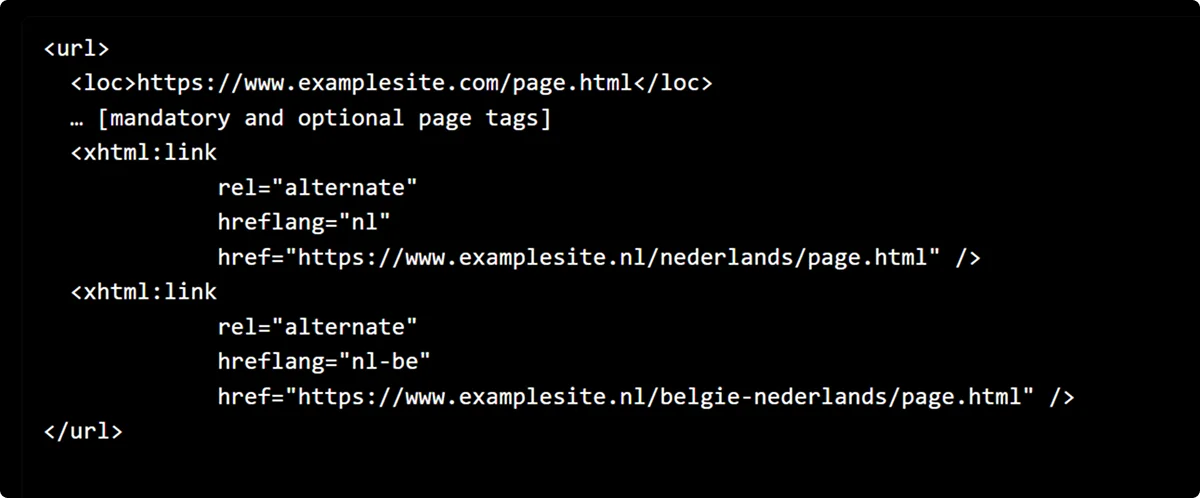
In this example, we have a Dutch version of the page for visitors in the Netherlands and another one for Dutch speakers in Belgium.
Here are complete lists of ISO 639-1 language codes and ISO 3166-1 alpha-2 country codes to use in your extensions.
Sitemap Extensions for Specialized Content
You can indicate images, videos, and news on your website and provide metadata for them in your sitemap.
Start by adding the relevant namespace declarations at the top of your sitemap. A sitemap with all three types of content may have the following:
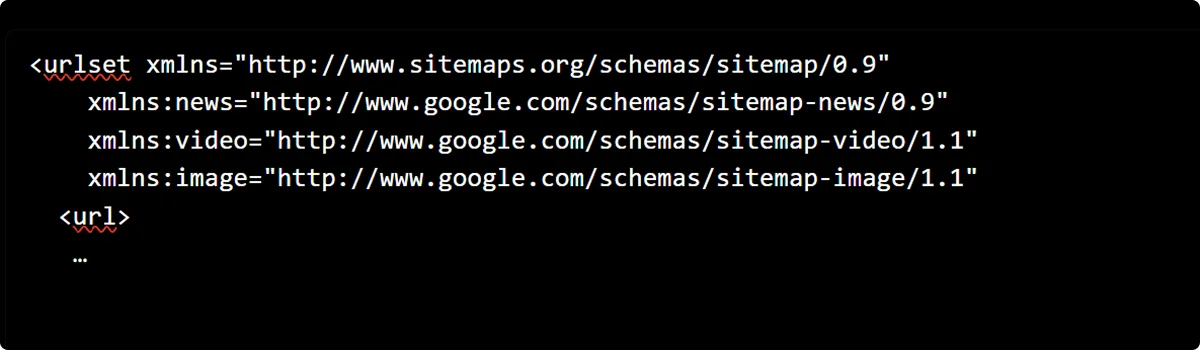
Although the above declarations were created by Google, they are universally recognized by all major search engines.
XML Tags for Specialized Content
You can use the following tags to define the specialized content on your pages:
Place these tags and data within URL entries in your sitemap. Here’s an example entry for a page containing a video:
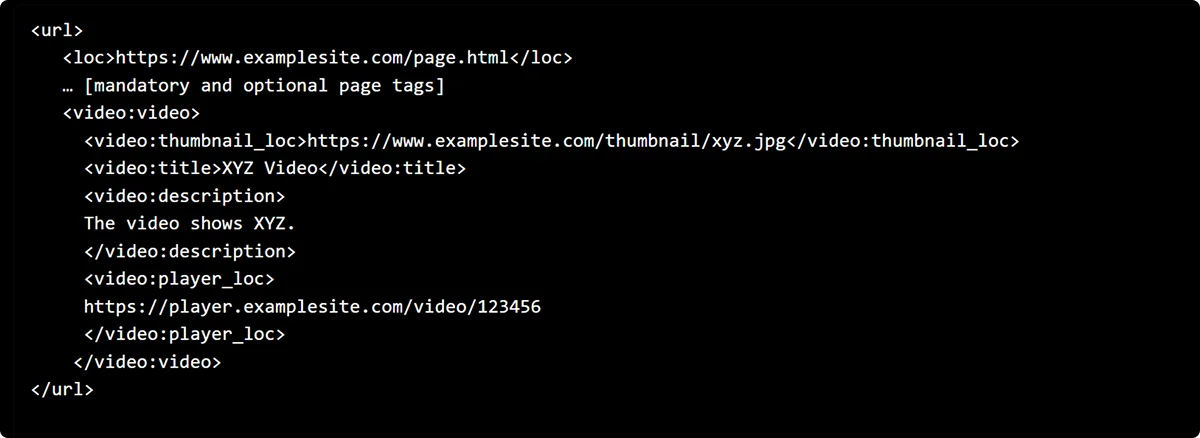
The extension tags are placed at the end of the URL entry here, but they can appear in any order within a URL entry, as long as they come after the mandatory and optional page tags. This applies to both specialized content and alternate regional pages.
If your website is large, supports 10+ languages, or features a lot of specialized content, you risk exceeding the 50 MB or 50,000 URL limit. In that case, you may need to create multiple specific sitemaps and link them using a sitemap index file.
What Is a Sitemap Index?
A sitemap index is a file that references multiple sitemaps, similar to a table of contents. If you pull up a sitemap for a complex website, such as Google’s or Apple’s, you’ll run into a sitemap index instead of a sitemap:
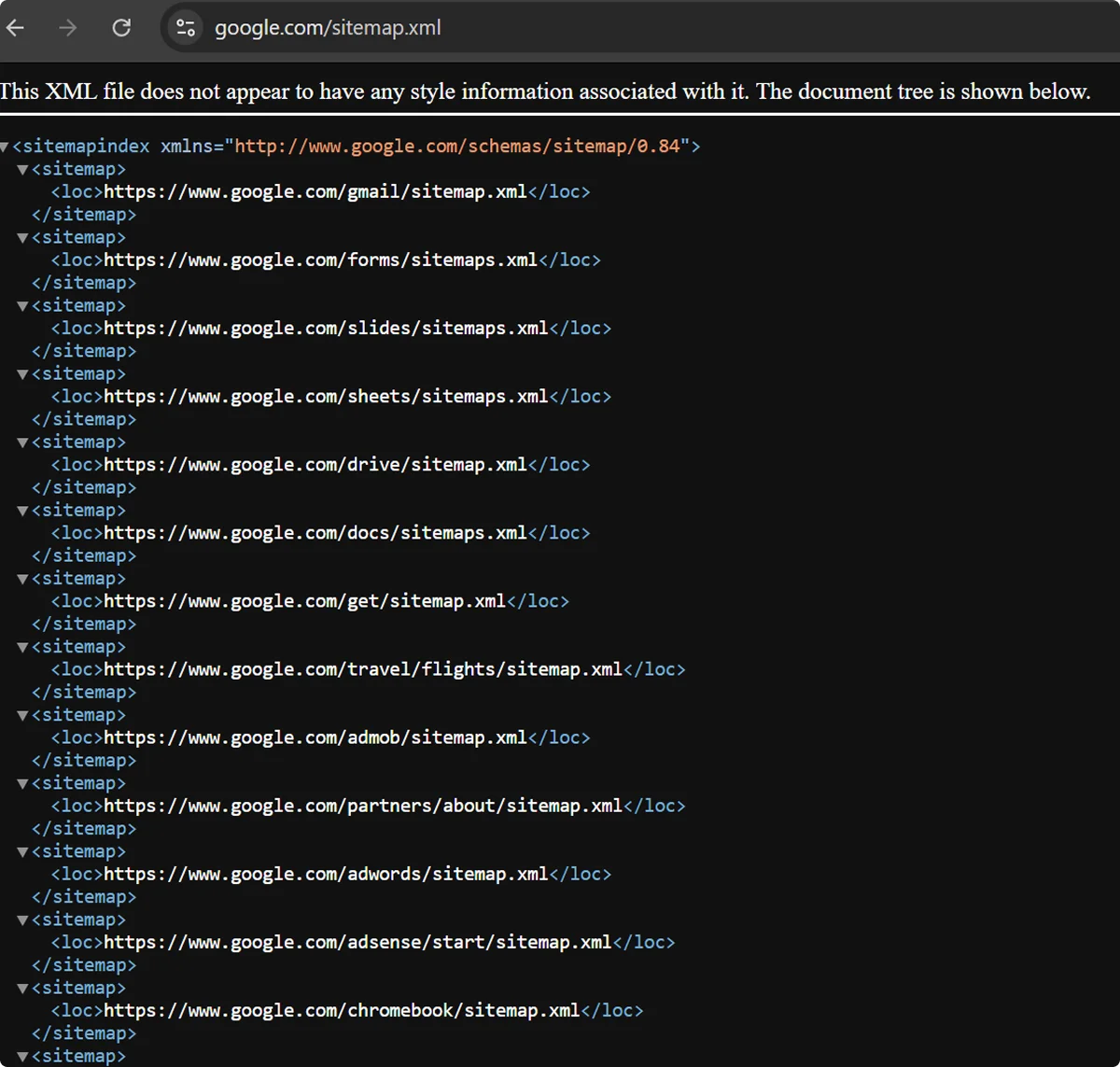
An index rests on the same 0.9 protocol as sitemaps and includes similar XML tags:
- <sitemapindex>: Surrounds the entire sitemap index
- <sitemap>: Surrounds sitemap entries
- <loc>: Specifies sitemap URLs
- <lastmod>: Specifies when the sitemap was last updated
How To Create an XML Sitemap
The first step is to select the URLs you want to display in search results. If some of your content is available under multiple URLs, choose one URL instead of including them all.
There are several ways to generate your XML sitemap:
- Via your CMS
- Via third-party tools
- Manually
CMS and Plugins
Some CMS platforms, such as WordPress and Shopify, automatically generate a sitemap. To check whether you already have one, add /sitemap.xml at the end of your full website URL.
If your platform doesn’t generate a sitemap or limits customization, try adding plugins and modules, such as Yoast or XML Sitemap Generator for Google.
Your CMS may also generate an RSS, mRSS, or Atom 1.0 sitemap, which is focused on the latest updates on your website. This can be a great addition to your XML sitemap, especially for blogs and news sections.
Third-Party Tools
Many tools exist to help you generate an XML sitemap and some even let you do so for free. For example, Screaming Frog and SEOptimer offer free plans with limited features. There are also several free tools, such as the Semrush Sitemap Generator.
These tools vary in terms of complexity, customization options, and auditing ability, so evaluate them carefully to select the best one for your needs and budget. For example, if you have a small website, a free and simple tool combined with Google Search Console for validation works well. But for larger websites, it may be worth investing in a complex tool with built-in audits and automatic updates.
Manual Method
Creating your XML sitemap manually only makes sense if your website has up to a few dozen URLs and you need full control over its layout.
To make a sitemap manually, you need a simple text editor like Windows Notepad. If you go this route, make sure to follow the standard format and include all the mandatory XML tags. Once you’re done, save the file as sitemap.xml.
If your website has no more than a few pages, you can create a text sitemap instead of an XML sitemap. This variant doesn’t require you to use tags or namespaces. Instead, you only need to list the URLs and save the sitemap as a .txt file.
Validating and Uploading Your XML Sitemap
Validate your sitemap before publishing to catch problems like formatting errors, broken URLs, and missing tags.
If you created your file manually or via a tool that doesn't have the validation option, upload it to Google Search Console’s Sitemaps report—it’s free. The report flags errors immediately, so you can fix them before they block indexing.
Aim to have as many of your indexable URLs indexed by Google. For a large website, a 95–80% score is still considered solid, while anything lower than 70% warrants thorough investigation and possibly restructuring.
Once Google greenlights your file, add it to the root directory of your website and include it at the end of your robots.txt file as follows:
Sitemap: https://examplesite.com/sitemap.xml
Here’s a quick to-do list to use when creating your sitemap:
- Follow the formatting precisely.
- Include all mandatory elements.
- Close your tags properly.
- Use entity-escape codes.
- Avoid duplicate and broken URLs.
- Use full URLs (with https or http://…).
- Don’t use redirecting URLs.
- Validate your sitemap.
- Reference the file in robots.txt.
- Place the file in your root directory.
- Split the file if it’s too large.
The work is not done once your sitemap is ready. You need to update it regularly so it reflects any changes on your website, then upload it to Google again. Some CMSs and third-party tools will audit, update, and upload your sitemap automatically through an API.
Conclusion
An XML sitemap is a small file with an outsized impact on your content’s visibility. A well-structured sitemap speeds up indexing and gives bots the metadata they need to understand your website.
Getting your sitemap right isn't difficult, but a sitemap alone won't move your rankings. It's only one component of a larger technical and strategic foundation.
If you need help building the rest of that foundation, reach out to Omnius. We optimize B2B websites for growth across search engines, handling everything from technical SEO to content execution.
Frequently Asked Questions
Are sitemaps still relevant?
Yes, sitemaps are still crucial for SEO in 2026. Search engine bots check your sitemap to better understand your website before crawling it. Without a sitemap, crawling could be inefficient and take longer, harming your visibility. This is especially problematic for complex websites with frequent updates.
Do XML sitemaps matter for AI search?
Yes, XML sitemaps serve both search engine and AI crawlers, including those for LLMs and AI overviews. Sitemaps help AI bots identify and structure content, which enables faster indexing and better fact retrieval.
Do I need a sitemap for a small website?
Technically, no, you don’t need a sitemap for a website under 500 pages, especially if it’s sufficiently linked and doesn’t have frequent updates or a lot of media. Bots can easily crawl websites with simple structures and content.
Still, it’s recommended to have one anyway. Doing so will facilitate the indexing of new content and help you discover any crawl issues.
If you have only a few webpages, you can create a simple text sitemap without XML tags, which should take only minutes.
Can ChatGPT create a sitemap?
Yes, ChatGPT and other AI chatbots can generate sitemaps for smaller websites, but it’s important to double-check everything and validate the file before publishing.


.png)

.svg)
















.svg)



























.svg)
%20for%20B2B%20SaaS%20%5BFull%20Guide%5D.webp)

.webp)