.png)

Robots.txt is a text file you can put in the root directory of your website to communicate with web crawlers. The file tells bots which parts of your website they should and shouldn’t access, which sets the stage for effective search engine optimization (SEO).
Still, Cloudflare found that only about 37% of the top 10,000 domains used robots.txt.
While small websites often face no consequences, large sites risk reputation-harming technical issues if the file is missing or poorly set up.
This guide offers a deep dive into robots.txt: its significance in SEO, must-have elements, and tips for successful implementation.
Key Takeaways
- Robots.txt is a plain text file that instructs bots how to crawl your website. Each website and subdomain needs its own version, which must be placed in the root directory of your hosting system.
- A well-configured file is essential for SEO performance. It helps preserve crawl budget and keep unwanted content out of SERPs. A missing or improper robots.txt could result in server overload or cause your website to appear broken, harming your rankings.
- Each file must follow standard syntax and formatting. The file uses Allow and Disallow commands under specific User-agent headers. These give you granular control over which bots can crawl which content.
- Creating the file requires precision at every step. Use a plain text editor, specify your rules carefully, validate with a testing tool, and update the file regularly as new bots emerge.
- Know and follow the best practices. Avoid blocking resources bots need to render your site, audit crawler behavior via server logs, and complement robots.txt with noindex tags and firewalls for highly sensitive content.
Importance of the Robots.txt File in SEO
Robots.txt instructs bots how to efficiently crawl your website or subdomain. Not all bots listen, but the ones that matter do. In those cases, a well-configured robots.txt can help with:
- Resource control: Search engines prioritize indexing your high-value, revenue-generating pages instead of wasting attention on low-priority or duplicate content.
- Faster processes: The file surfaces key directories for indexing and guides to the sitemap, allowing bots to crawl your website quickly. That naturally leads to faster indexing and updating in search results.
- Confidentiality: You may want to keep some pages or content private, such as account dashboards or staging environments for testing. Robots.txt can instruct bots not to crawl these resources.
Restricting bot activity preserves your crawl budget—the time and resources search engines can devote to crawling your site. Crawl budget management is critical for large sites with frequent updates, which can lose sales due to indexing latency.
In a 2026 case study from Linkgraph, an e-commerce site generated an additional $125K per month in organic revenue through technical SEO alone, achieving a 733% ROI. Updating robots.txt was the first action in its strategy.
What Happens if There Is No Robots.txt File?
Without a robots.txt, bots crawl indiscriminately. That means they take longer to get to important content, which harms your rankings and revenue. The excessive crawling could also overload your server and slow down your website.
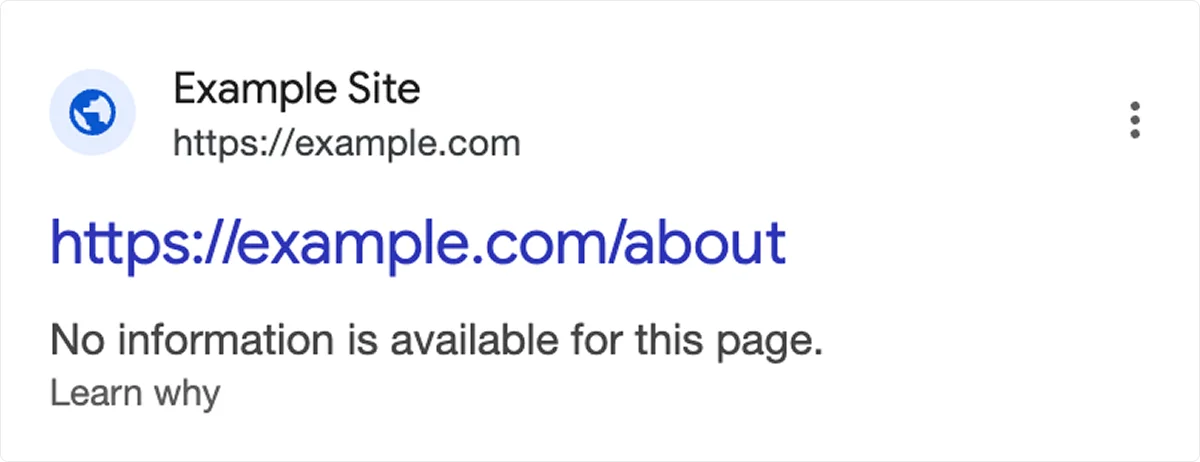
A poorly configured file is equally problematic. If bots run into issues with the file, they may not read or evaluate your content correctly. For example, the search engine may view the page as broken or display it without a description.
What Should a Robots.txt File Look Like?
Robots.txt should look like a plain text file containing rules for different website elements. Each website (e.g., linkedin.com) and subdomain (e.g., uk.linkedin.com) must have its own version.
The files are publicly available. If you want to see how industry giants manage their crawl priorities, you only need to add /robots.txt to the end of their website URL.
Each file follows a standardized format proposed by the Internet Engineering Task Force (IETF) in 2022.
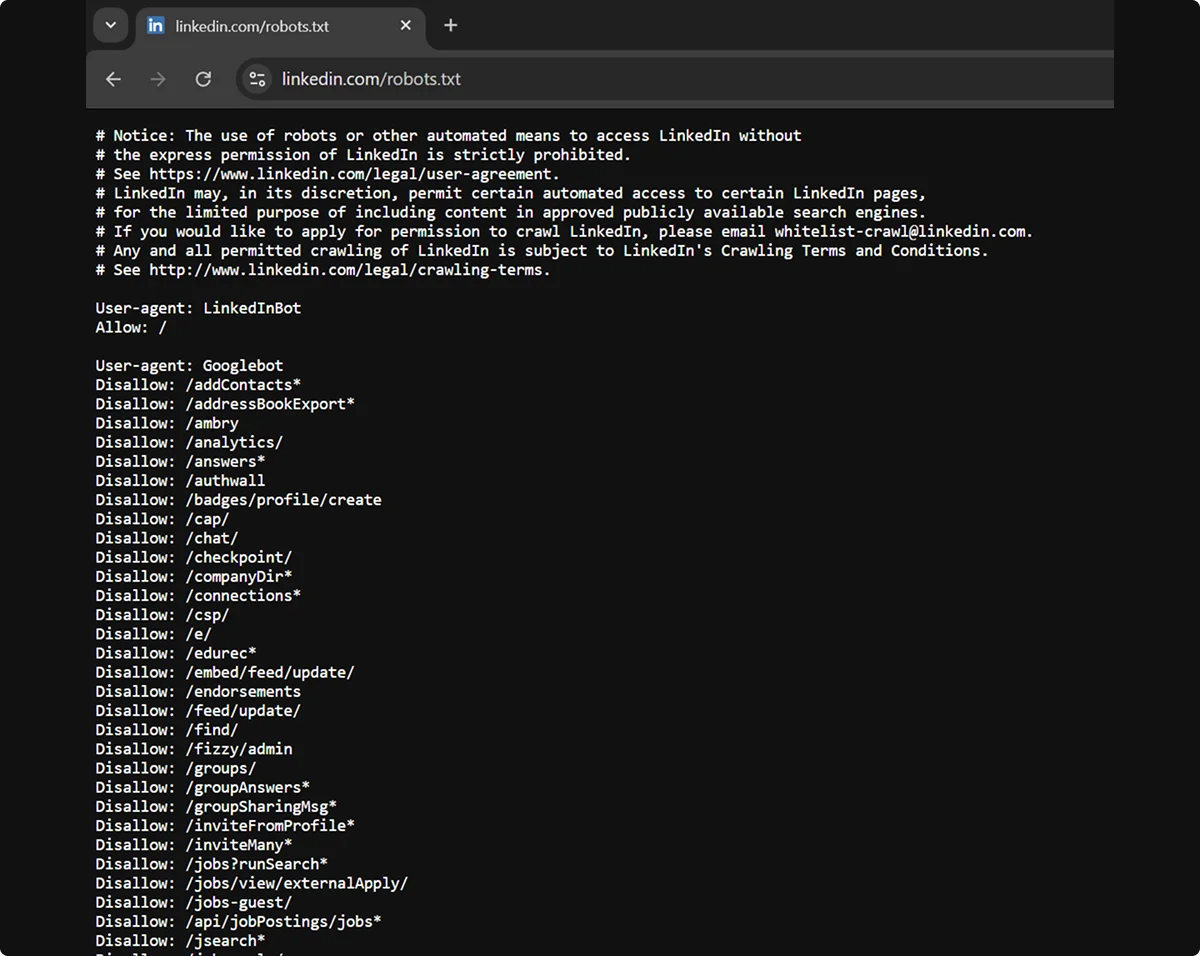
The file may vary significantly across websites. For example, some contain only a few broad rules, while others have a long list of highly specific rules. Still, the syntax for communicating with bots is universal:
Keep in mind that not all bots support all commands and symbols. Googlebot, for example, doesn’t follow the Crawl-delay directive, while some less common bots can’t read * and $ symbols.
How Does Robots.txt Work?
Bots that comply with robots.txt will check the file before crawling the website, and then follow the applicable set of rules. In case of contradictory instructions, the bot will usually follow the more specific ones.
Robots.txt is based on the Robot Exclusion Protocol, which uses Allow and Disallow commands to tell bots which websites, pages, and content to skip. Doing so doesn’t hide the content from bots or visitors, though. The command only indicates that the pages aren’t relevant for the search engines.
A combination of Allow and Disallow rules gives you granular control over the crawling of your website. For example, you can instruct bots to skip an entire directory, but include a specific important file, like in this example:
Disallow: /xyz-directory/
Allow: /xyz-directory/relevant-file.html
The $ and * symbols also help you create specific rules. Here’s an example of how you can use them together to tell bots to scan a complete directory but skip all .html files within it:
Allow: /xyz-directory/
Disallow: /xyz-directory/*.html$
Sitemaps Protocol
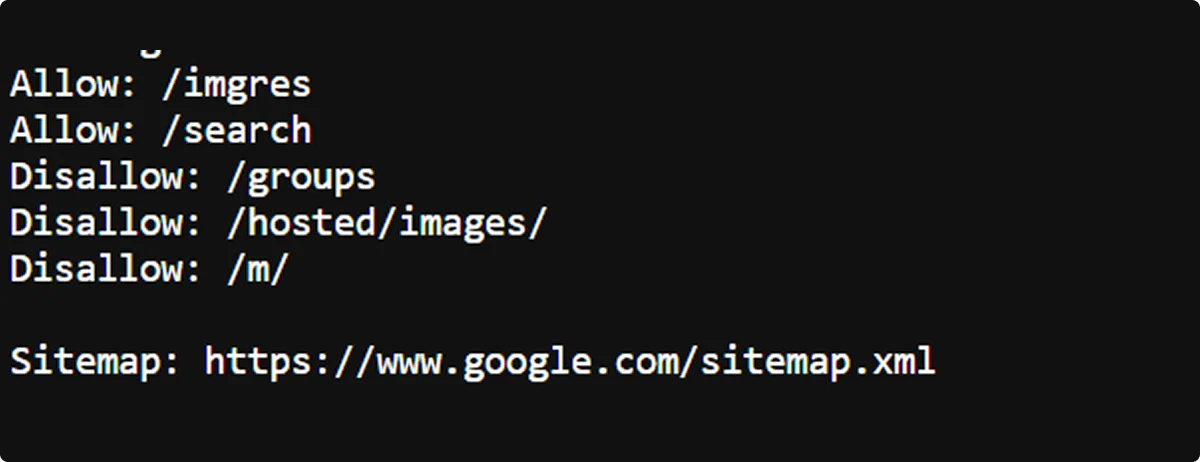
The bottom of robots.txt files usually contains a link to the sitemap, a file featuring a detailed list of the website's pages. Large websites often contain multiple sitemap directives.
Sitemaps help bots understand the structure and hierarchy of the website’s content. They may also provide other information, such as update timestamps or alternate language versions.
How To Create a Robots.txt File
The process is simple on paper—you only need to create the robots.txt file and place it in the root directory of your website. Still, following all steps and best practices is necessary to get it right.
Start by opening a text editor, such as Notepad or Yoast’s robots.txt generator. Don’t use a word processor like Microsoft Word or Apple Pages, as these may introduce additional characters and formatting that crawlers can’t read.
Here’s what to do next:
- Prepare: Decide which bots should and shouldn’t crawl your website. Disallow duplicate, irrelevant, and private pages, such as user accounts, shopping carts, and confirmation screens.
- Create: Before the rules, specify the bot with User-agent or use the asterisk to address all of them. Write the rules, combining Disallow and Allow commands for specific cases. Add the sitemap and other elements as needed.
- Save: Make sure the file name is robots.txt exactly, otherwise crawlers may not recognize it.
- Test: Check whether your commands work. There are many free tools available, such as Google Search Console or the robots.txt Tester Tool.
- Upload: Place the file in the root directory of your website via your FTP client, hosting file manager, content management system, or SEO plugin.
- Update: New bots pop up frequently. Stay in the loop and revise your robots.txt regularly to ensure new crawlers aren't accessing content you'd rather keep off-limits.
Robots.txt Best Practices for SEO
A single character can make the difference between an effective robots.txt file and an SEO-tanking one. Here's how to stay on the right side of that line:
Be Precise
Write your robots.txt carefully and validate it before publishing, as even minor issues can result in errors or misinterpretation. Pay attention to the following:
- Spelling mistakes in your file or its name
- Missing characters
- Improper capitalization
- Incorrect command orders
Restrict Access Mindfully
Disallowing too many pages on your website can harm your SEO performance.
This is especially true with key assets such as:
- CSS, /css/
- JavaScript, /js/
- API endpoints, /api/
These resources help bots understand your website’s layout and functionality, and render it properly. Without them, crawlers may see your pages as mobile-unfriendly or broken and rank them poorly.
To prevent that, make sure your broad disallow commands don’t encompass the above resources, or include appropriate Allow commands if they do. And, as always, test your file, since most checkers will flag the issue.
Audit Crawler Behavior
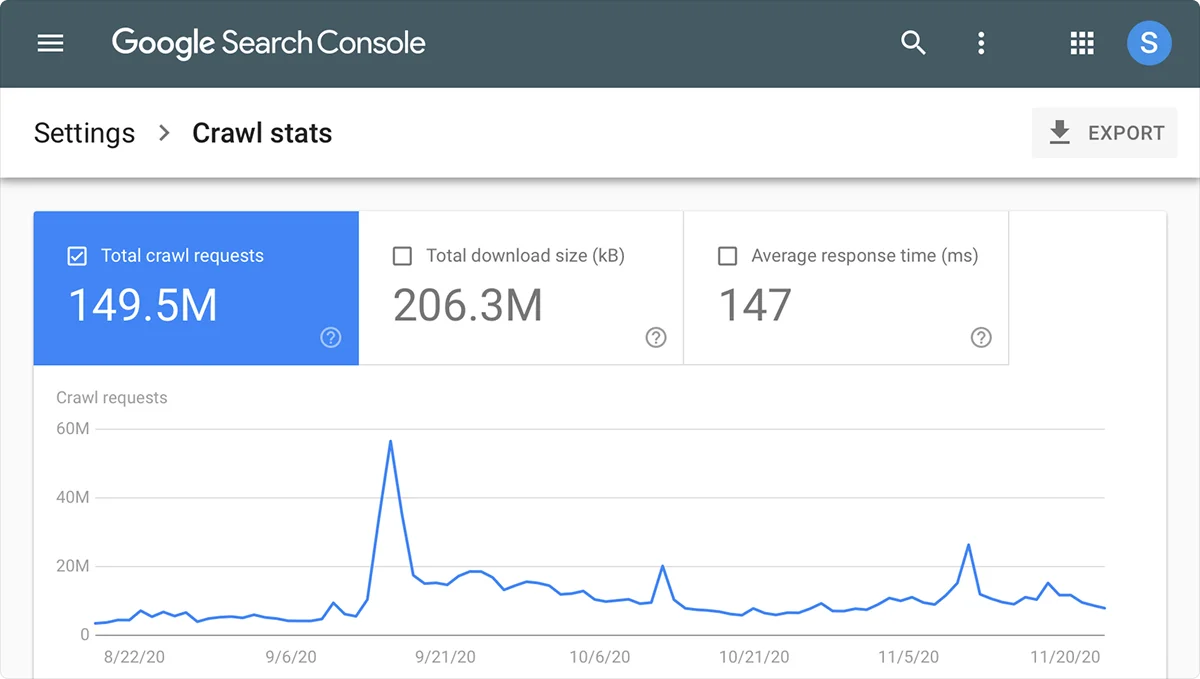
Monitor your server logs or analytics regularly to confirm bots are crawling as intended and optimize the file accordingly. You can check their activity in the access.log file in your hosting panel, Crawl Stats in your Google Search Console, or any other external tool.
Don’t Rely on Robots.txt
Robots.txt is a request, not an access control.
Reputable crawlers like Googlebot follow it, whereas malicious bots don't even read it. To protect sensitive data, you need to take additional measures, such as passwords and firewalls.
Additionally, note that links leading to your pages can interfere with Disallow commands, causing Google to index them anyway. Use the noindex meta tags and x-robot tags to keep unwanted pages away from the SERPs.
Final Thoughts
Robots.txt is a fundamental part of technical SEO, especially for complex websites. A well-configured robots.txt directs bot activity, optimizes crawl budget, and prepares your site for successful search engine indexing.
While creating robots.txt isn’t difficult, precision is necessary to achieve the desired outcomes. Additionally, it represents only a small step toward the top of search rankings.
If you need help getting there, consider partnering with a professional SEO agency like Omnius.
We specialize in B2B organic SEO and AI search growth, including its technical, strategic, and creative aspects. Contact us and see how we can shorten your trip to page one.
Frequently Asked Questions
Is robots.txt still used?
Yes, robots.txt is still a common SEO practice in 2026. Although not everyone uses it, large websites typically have them, one for each subdomain.
How do I find the robots.txt file?
To view the robots.txt file of any website, type /robots.txt at the end of its URL in your browser’s address bar.
If you need to find and edit your own website’s robots.txt, you can do so via your content or hosting file management system. The file is always located in the root directory, which is the top-level folder of your file system.
Is ignoring robots.txt illegal?
No, robots.txt is generally not a legally binding statute, though not following it could result in lawsuits on other grounds.
Under EU law, however, the file carries more weight. If you disallow the mining of your content and the company ignores the directive, it’s infringing copyright and may face injunctions, damages, and fines.
What’s the difference between robots.txt, meta robot tags, and X-robot tags?
Robots.txt affects crawling or content discovery, while meta robot and x-robots tags manage indexing, the process of analyzing content to determine search engine eligibility:
Is there a robots.txt for AI engine optimization?
No, robots.txt is a universal document that can apply to both search engine bots like Googlebot and AI bots like GPTBot. While a dedicated file for AI models, called llms.txt, has been proposed and used by some websites, it still hasn’t become a standard.
In robots.txt, the User-agent: * command targets both types of crawlers. If you want to exclude AI scrapers specifically, you’ll need to use the Disallow command for each AI bot. Here’s a list of crawlers for some of the most popular LLMs in 2026:
But should you block AI crawlers from training on your content?
Doing so may harm your brand’s visibility in AI-powered search. McKinsey found that about 50% of consumers use AI search today and estimates that the figure will rise drastically over the next few years.


.png)

.svg)
















.svg)


























.svg)
%20for%20B2B%20SaaS%20%5BFull%20Guide%5D.webp)

.webp)