


Next.js SEO agency for Google and AI search We check every route in every release
Next.js sends complete HTML by default. We keep each route's content, metadata, and redirects correct through every release.

Rendering & Caching
We set static generation, ISR, or request-time rendering per route, with revalidation timed to how often its prices and plans change.

Server Data
We move data fetched in useEffect or loaded with ssr: false into Server Components, so prices, plans, and docs answers are in the HTML.

Metadata & Streaming
We set titles, descriptions, and robots tags through the Metadata API and check where each tag lands when generateMetadata streams.

Canonicals & hreflang
We give every route its own canonical from metadataBase and keep layouts, preview URLs, and trailing slashes from creating duplicates.

Sitemaps & Robots
We generate sitemap.ts and robots.ts from the content source, with every indexable route listed and real update dates.

Status Codes & Redirects
We return real 404s before a response starts streaming and keep redirects in one map across next.config, proxy.ts, and the CDN.

Programmatic Routes
We build integration, comparison, and location routes with generateStaticParams and decide which are prerendered, which render on first visit, and which return a 404.

Core Web Vitals
We size next/image for each template, load fonts with next/font, and cut client JavaScript, then track LCP, INP, and CLS from real visits.

Releases & Migrations
We check every pull request on its preview deployment and plan Next.js upgrades and App Router moves route by route, with redirects mapped first.





On Next.js, SEO changes with every pull request.
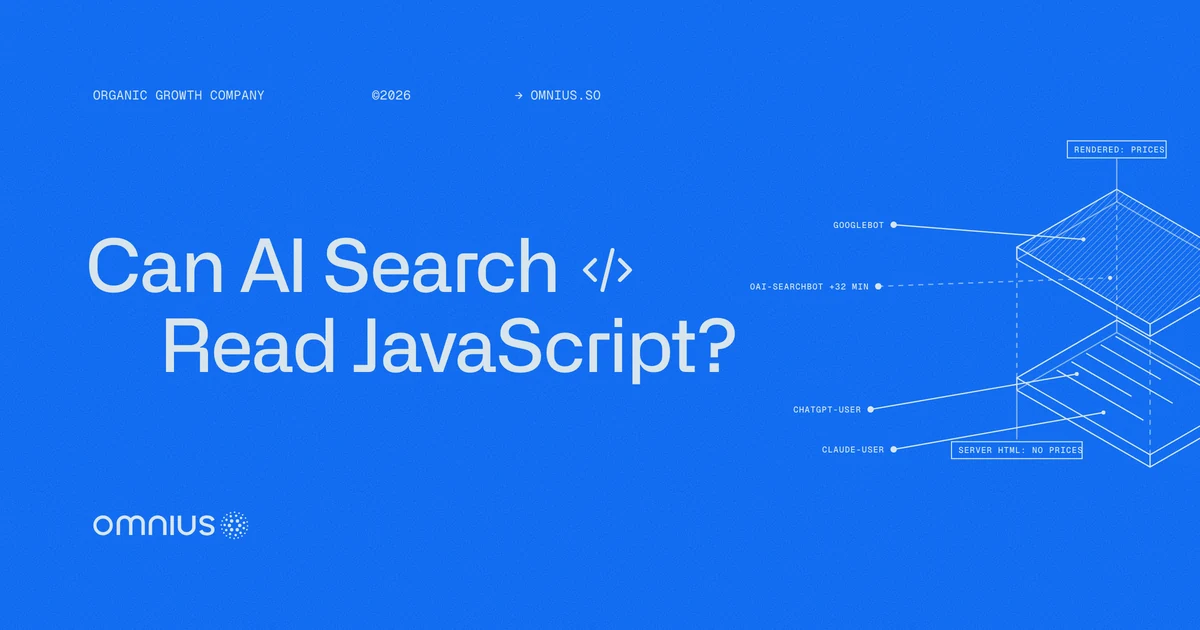
Next.js sends server-rendered HTML for every route. Server Components render on the server, and Client Components are prerendered into the same HTML on the first load. Data fetched in useEffect is the exception: effects run only in the browser, so that content is missing until scripts run.
What changes from route to route is timing. A route rendered at request time can stream. The response starts with a 200 status, and the tags from generateMetadata can arrive after the content, at the end of the body. Next.js holds them for the head only for the bots on its default list, and that list leaves out the fetchers ChatGPT, Claude, and Perplexity use.
All of it is set in code, so a pull request can change it. A fetch moved into a Client Component, a revalidate value that keeps an old price cached, or a redirect added to proxy.ts changes what a route sends to Google and AI fetchers, without anyone editing the page. We test each priority route on its preview deployment before the change merges, and again on production after it ships.
AI fetchers
Next.js route response, in order
What gets read
Every pull request runs the same release checks.
On Vercel, each pull request gets its own preview deployment. Priority routes are tested on that preview before the merge and on production after it.
| Stage | What can change | What we check | What we do |
|---|---|---|---|
| Pull requestCode, content, or config changes on a branch | Where data loadsA fetch moves into a Client Component, or a revalidate value changes. | The diffEvery change to pages, layouts, metadata, next.config, or proxy.ts. | We flag SEO risk as a review comment before the branch merges. |
| Preview deploymentBuilt by Vercel for each pull request | Content and tagsPrices, canonicals, and robots tags can differ from production. | The first responseRequested as Googlebot, ChatGPT-User, Claude-User, and PerplexityBot. | We compare each priority route on the preview with the same route on production. |
| Release checksPass or fail for each priority route | Status and redirectsA missing page can return a 200, and a redirect can chain or lose its target. | The gateStatus code, redirect target, tags in the head, and the sitemap entry. | A failing route goes back to the pull request with the failed check attached. |
| ProductionThe merged release on the live domain | Cached pagesA cached route keeps the old version until it revalidates. | The live routeThe same requests, repeated on the production domain. | We close a fix only when the live route carries it. |
| After releaseCrawler logs and AI answers | Crawler accessA firewall rule can turn away an AI crawler that robots.txt allows. | Visits and answersCrawler logs, Search Console, and AI answers to pricing prompts. | We measure each release against the Day-0 baseline and report the change. |
Vercel adds three places to check: firewall, logs, and deployment URLs.
Rendering, metadata, and routing work the same on any Node.js host. On Vercel, managed firewall rules, log forwarding, and public deployment URLs also decide what search and AI crawlers reach.
Firewall
AI Bots ruleset
Each category set to match robots.txt, so an AI crawler the company allows isn't denied at the edge.
Bot Protection
Its challenge stops non-browser traffic, so crawler logs confirm which AI fetchers still get through.
Logs
Drains
Runtime logs forwarded to crawler monitoring, on Vercel's Pro and Enterprise plans.
Crawler visits
Each visit labeled by crawler and purpose, so a release that cuts AI crawler visits shows in the logs.
Deployment URLs
Preview deployments
Kept out of the index by Vercel's noindex header, except previews on a branch's custom domain, which need protection or the header.
The vercel.app address
It serves production publicly, so we redirect it to the main domain.
Next.js SEO starts with a map of every route, then follows each release.
01Route map & baseline
Work begins with the business, then the code: the ideal customer profile, competitors, and search history, then every route type with its router, rendering mode, revalidation setting, and data source.
Search Console and crawler logs are connected first, so the Day-0 baseline covers rankings, crawler visits, and how AI answers describe the company's prices and products.
02First-response audit
Each priority route is fetched as Googlebot, ChatGPT-User, Claude-User, and PerplexityBot, and what each one receives is compared with the rendered page: content, links, metadata, status codes, and JSON-LD.
Robots.txt, the firewall, and bot protection are reviewed separately, since each can answer AI crawlers differently.
What the audit delivers
- A route map: every route type with its router, rendering mode, data source, the facts it carries, and its commercial priority.
- A first-response report for each priority route: what Googlebot, ChatGPT-User, Claude-User, and PerplexityBot receive, set against the rendered page.
- A metadata and canonical map: the title, description, canonical, hreflang, and robots tag of every route, where each tag lands, and which values a layout passes down.
- A sitemap and robots review: indexable routes missing from sitemap.ts; listed URLs that redirect, return errors, or point their canonical elsewhere; and lastModified dates checked against real updates.
- A status and redirect map: how missing pages respond, redirect chains across next.config, proxy.ts, and the CDN, and temporary redirects that should be permanent.
- An access review: robots.txt, firewall, and bot protection rules for each search and AI crawler, confirmed in crawler logs.
- A fix plan ranked by commercial value: each fix with its route, the files it touches, an owner, and the check that closes it.
- A walkthrough with the marketing and engineering teams.
03Fixes in pull requests
Content and tags move into the first response, and interactive tools keep their client code. The work covers Server Component refactors, the Metadata API, revalidation settings, sitemap.ts and robots.ts, and one redirect map.
Omnius developers open the pull requests themselves, or, when the company's own engineers own the code, write each fix as a ticket with an acceptance test it must pass on the preview.
04Release checks & reporting
After each merge, the priority routes are requested again on production, and the result is logged against the Day-0 baseline.
Later releases and Next.js upgrades go through the same checks, and clients follow every fix and its result in Omnius reports they can open at any time.
Five places Next.js SEO breaks, and how each one is checked.
Every release is measured for search crawlers, AI agents, and people.
Omnius technology requests each priority route the way crawlers, AI fetchers, and browsers do, and repeats the check after every deployment.omnius.so/technology
For search crawlers
Content in the first response
Prices, plans, and docs answers in the HTML of every priority route.
One canonical per URL
Each route names itself, and the canonical Google selects in URL Inspection matches it.
Sitemaps that match the website
Every indexable route listed, and nothing that redirects or returns an error.
For AI agents and assistants
Facts from the company's own pages
AI answers to pricing and product questions measured for citations of the company's routes.
Tags where readers look
Title, canonical, and robots tags checked in the response each AI fetcher receives.
AI crawlers let through
Crawler logs confirm that each AI search crawler gets a 200 response.
For people
Faster routes
LCP, INP, and CLS from real visits, for each template a release touched.
Safer releases
Every deployment and Next.js upgrade rechecked against the Day-0 baseline.
Results in the open
Live view access to the Omnius reports behind every fix.
Results from Omnius work on technical SEO and AI search.





Guides and research behind our Next.js work.



Let's build together.
Questions & Answers.
Yes, when each route is configured for it. Next.js renders pages on the server by default, so crawlers get HTML instead of an empty shell. What reaches that HTML still depends on choices made route by route: where data is fetched, how long pages stay cached, whether metadata streams, and how canonicals, sitemaps, and status codes are set.
Omnius is a Next.js SEO agency that works in the codebase and checks every release. Our developers ship changes as pull requests or review the in-house team's, each priority route is tested on the preview and again on production, and our own technology reads every route the way AI crawlers do. Omnius works only with B2B software companies (SaaS, fintech, and AI), so pricing, integration, and docs routes come first, because buyers compare vendors on them.
It can change status codes and where metadata lands. A streamed response starts with a 200 status, so a page that calls notFound() after streaming begins returns a 200 with a noindex tag, which some crawlers report as a soft 404. On routes rendered at request time, metadata can also stream into the body, and Next.js keeps it in the head only for the bots on its default list, which leaves out the fetchers ChatGPT, Claude, and Perplexity use. Both are fixed in the code: a real 404 from proxy.ts, and metadata that is cached or held for the head.
Both send complete HTML when they are configured for it. The App Router adds the Metadata API, sitemap.ts, robots.ts, and Server Components that send less JavaScript to the browser. Pages Router routes set the same tags with next/head and load server data with getStaticProps or getServerSideProps.
URLs, metadata, redirects, and internal links on every route that moves. In the App Router, next/head gives way to the Metadata API, and getStaticProps and getServerSideProps give way to data fetched in Server Components, so each moved route is rewritten. We plan the move route by route, map redirects before any URL changes, and test each moved route on its preview before release, as in any website migration.
No. In the App Router, the Metadata API and the sitemap.ts and robots.ts files cover titles, canonicals, hreflang, Open Graph tags, sitemaps, and robots rules, and JSON-LD renders as a script tag in the page or layout. Rendering, metadata, and routing work the same on Vercel or a Node.js server. On Vercel, preview deployments carry a noindex header by default, except previews served from a custom domain assigned to a Git branch, which need protection or the header added.
Both, and the split follows who owns the repository. With repository access, Omnius developers open the pull requests. When the company's engineers own the code, each fix becomes a ticket with an acceptance test, and we review the pull request and its preview before it merges. A fix counts as done only when production carries it.
With a route map and a Day-0 baseline, inside an ongoing engagement. A free 30-minute call settles fit. The first phase maps every route type, connects Search Console and crawler logs, and records the baseline for Google, AI answers, and crawler visits. Fixes then start with the routes that carry prices, plans, and docs.
The route changes as soon as the release ships. Indexing, rankings, and AI answers follow on their own schedules, and the reports record each change against the Day-0 baseline.
There is no fixed package or price list. Next.js SEO runs inside a continuing SEO and AI search engagement, never as a one-off audit, and the proposal sets scope and price around the company, its market, and the routes that matter most.
Omnius is a full-stack AI SEO agency. Explore more of our services.
Crawling, indexing, website architecture, and performance across the whole website.
How AI engines understand the website, where the visibility gaps are, and what to fix first.
Content and pages built to be cited in ChatGPT, Claude, Perplexity, and Gemini.
Rendering, crawler access, and metadata fixes for websites on any JavaScript framework.
Website design, development, and conversion work.
The data, workflows, and AI infrastructure behind our strategy, execution, and measurement.

Omnius is an AI-native SEO & GEO agency maximizing the probability of B2B SaaS & Fintech companies being included in AI answers, selected by agents, and chosen by humans.