


JavaScript SEO agency for Google and AI search We fix rendering, crawler access, and metadata in the code
Search engines, AI crawlers, and agents read the HTML the server sends. We put product, pricing, and docs content there.

Rendering Audit
We compare the HTML each page type sends with what a browser shows after JavaScript runs, and list the content, links, and tags that only scripts add.

AI Crawler Access
We find the robots.txt lines and firewall rules that turn away AI crawlers, and clear them before any template work.

Server-Side Rendering
Where key content waits for the browser, we move it to server-side rendering or static generation, starting with the product, pricing, and documentation pages.

Component Fixes
We move script-loaded content, tabs, FAQs, and directories into the HTML, while calculators, demos, and chat widgets keep their JavaScript.

Metadata & Schema
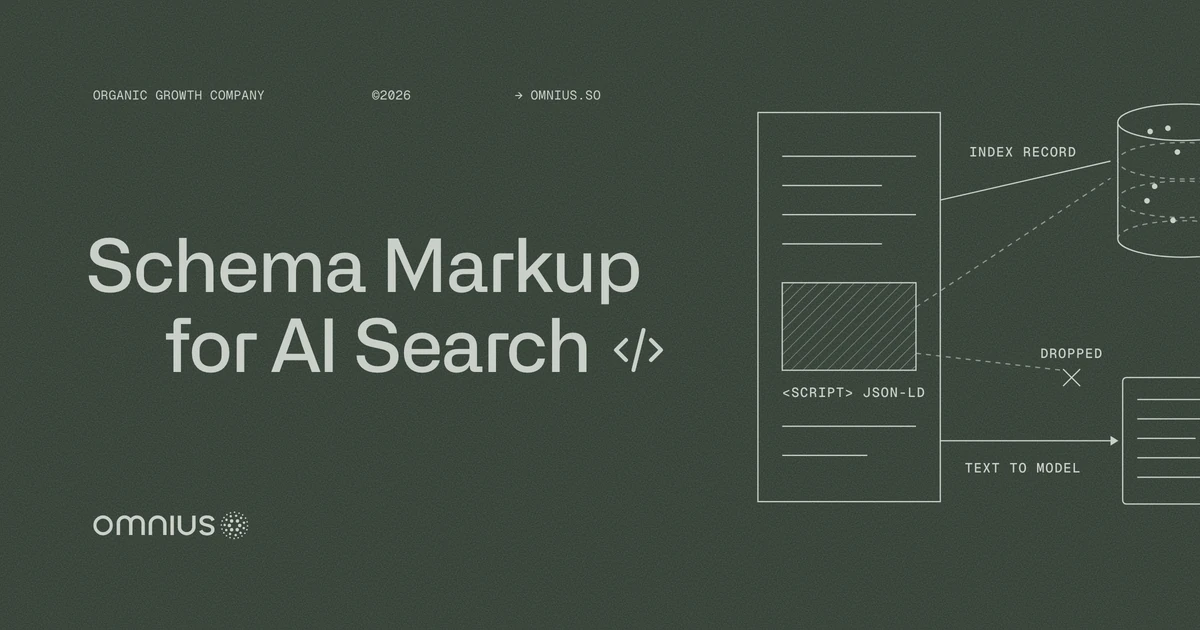
We put page titles, preferred URLs, indexing instructions, language targeting, and structured data in the server's HTML, with data that matches the visible text.

Links & Routing
We replace script-only navigation with standard internal links, give load-more lists numbered pages, and return the right status code for every route a crawler requests.

Core Web Vitals
We cut unnecessary JavaScript, defer nonessential third-party scripts, and measure loading speed, responsiveness, and visual stability from real visits, using lab tests to diagnose problems.

Crawler Logs & Rechecks
We read server and firewall logs to see which crawlers reach which pages and what they get, and close each fix only after we confirm it on the live website.

New Builds & Migrations
We review rendering, links, and metadata on staging before a redesign, a framework change, or a move to a headless CMS goes live.





JavaScript is limiting AI search visibility.
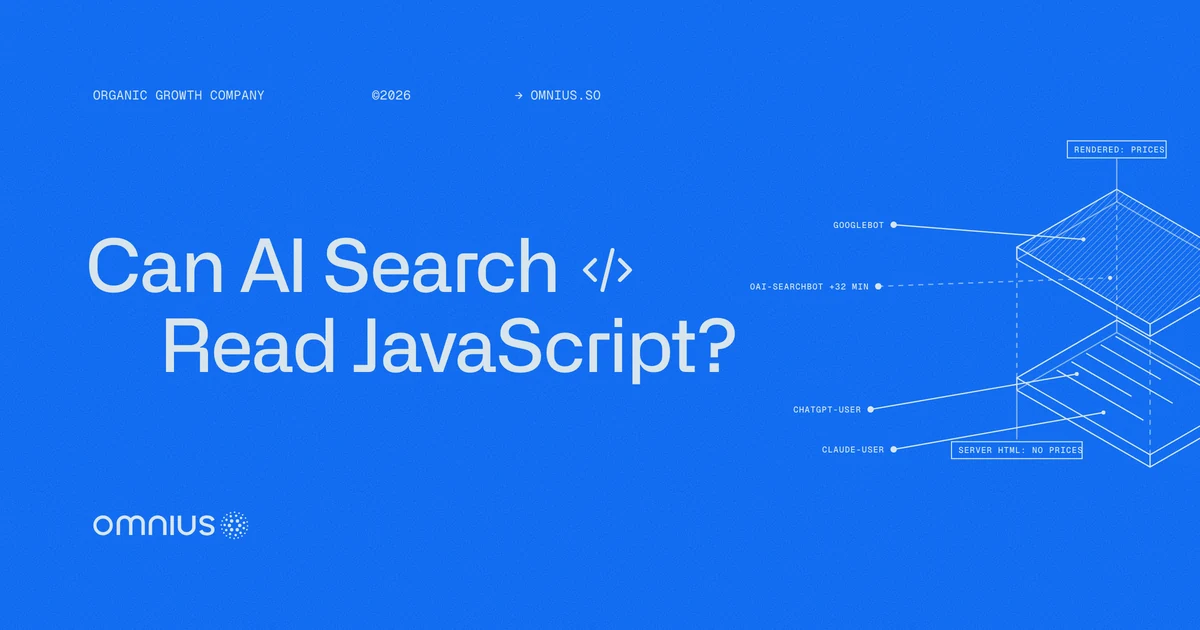
Most AI assistants that open a page while they write an answer read only the HTML the server sends. In published tests, a feature list, a pricing table, or a docs tab loaded by JavaScript was missing from what ChatGPT and Claude read. Google does render JavaScript, but later, and it does not click a tab or scroll a list.
Those are the sections people check before they shortlist a vendor. When ChatGPT can't find a price on a vendor's own pages, it gives one anyway. In our pricing test, it named a price for all 10 vendors that showed no plan price on their homepage or pricing page, and for 5 of them it cited a marketplace listing as the source.
We move that content into the HTML and check each fix on the live website. Access gets checked too: in our test of 500 enterprise websites, about 6% appeared to block ChatGPT or Perplexity search crawlers despite allowing them in robots.txt.
AI crawlers
Server response
What gets read
Google runs JavaScript. Most AI fetchers read only the server's HTML.
The few assistants that run JavaScript give it a few seconds. We test every template the way each crawler requests it and move what matters into the first HTML response.
| Crawler | Engines | JavaScript | What we do |
|---|---|---|---|
| Googlebot | Google Search, AI Overviews, and AI Mode | Runs JavaScriptRenders pages in an up-to-date Chrome before indexing them. | We compare Google's rendered view in URL Inspection with the live page and fix whatever is missing from it. |
| OAI-SearchBot | ChatGPT search | Runs it on some pages, laterOn one measured website, it rendered pages a median 32 minutes after the first fetch. | We put key content in the server's HTML, so ChatGPT search reads it on the first fetch, and check that robots.txt and the firewall let it through. |
| ChatGPT-User | ChatGPT, when it opens a page mid-answer | Reads the server's HTML onlyIn published tests, it read only what the server sent. | We fetch each template the way ChatGPT does and move whatever it misses into the server's HTML. |
| Claude-User | Claude, when it opens a page mid-answer | Reads the server's HTML onlyAnthropic's documentation says its web fetch tool does not support pages rendered with JavaScript. | We fetch each template the way Claude does and move whatever it misses into the server's HTML. |
| PerplexityBot | Perplexity | No rendering in the last published testIn Vercel's December 2024 measurement, Perplexity's crawler read only the HTML. | We put key content in the server's HTML and check that robots.txt and the firewall let PerplexityBot and Perplexity‑User through. |
| Live page fetch | Gemini | Read the server's HTML in a 2026 testIn a March 2026 test of six assistants, Gemini's live fetch read the raw HTML only. | We put key content in the server's HTML, so a live fetch and Google's rendered index see the same page. |
| Live page fetch | Copilot, Grok, and DeepSeek | Run it for a few secondsIn the same March 2026 test, they ran JavaScript for 0.5 to 3 seconds. | We move key content out of slow scripts and click-only components, so a short render still reaches it. |
| Other fetchers | Meta AI, Qwen, and other assistants | Checked on each websiteWe read what their fetchers request and receive in each website's crawler logs. | We test each template the way their fetchers request it and keep key content in the server's HTML, so every reader gets it. |
JavaScript SEO starts with product, pricing, and docs pages. Here's how we do it.
01Discovery
We start with the company and its revenue pages: the ideal customer profile, competitors, historical search data, and the product, pricing, integration, security, and docs pages, with the framework behind each.
The output is a fact sheet per page and a Day-0 baseline across Google, AI answers to commercial questions, and crawler logs.
02Audit
Each template is checked the way Googlebot, ChatGPT, and Claude read it: the raw HTML against the rendered page, Google's URL Inspection, and the AI assistants' fetch.
Crawler access is reviewed on its own, because a firewall can turn away a crawler that robots.txt allows. The output is a fix plan ordered by commercial value.
03Fixes
What should rank moves to the server, and interactive tools keep their JavaScript.
Our developers ship the fixes, or write them as tickets with acceptance tests when the in-house team keeps the code. Every change goes through staging checks first.
04Validation & reporting
Every fix is checked on the live website as soon as it ships, then measured against the Day-0 baseline.
Clients get view access to Omnius reports and see each fix and result as it is recorded. Key templates are checked again in each monthly technical audit.
We ship fixes in the framework the website already runs on.
When the in-house team keeps the code, we review every release. On website builders, the same checks cover embedded widgets and third-party scripts.
Next.js
Data fetched in a Server Component is in the HTML; data fetched in a client component shows up only in the browser.
React
Single-page React apps send an almost empty HTML shell until the browser runs the code, unless they render on the server.
Vue & Nuxt
Vue apps render in the browser by default; Nuxt renders pages on the server or at build time.
Angular
Angular apps render in the browser unless server-side rendering or prerendering is set up.
Astro
Pages build to static HTML, and components marked client:only render only in the browser.
Headless stacks
Content rendered at build time or on the server is in the HTML; content fetched after the page loads is not.
Webflow
Native elements and CMS fields publish as HTML; content loaded by embedded scripts does not.
WordPress
Theme templates render on the server, but tables and tabs built by client-side plugins wait for the browser.
Framer
Pages publish as prerendered HTML, except code components that fetch their data in the browser.
Every audit compares the raw HTML with the rendered page.
Every fix is measured for crawlers, agents, and humans.
All of this data comes from Omnius technology. It reads each page the way search crawlers, AI agents, and visitors do, and runs again after every fix.omnius.so/technology
SEO audit
Site health
One score for the technical quality of each crawl.
Errors, warnings, and notices
Every issue, counted by severity.
Pages crawled
How many URLs each audit reaches, run over run.
Crawl log
HTTP errors, timeouts, and 403 blocks by template.
Affected URLs
Every URL behind an issue, grouped by template.
Fix rechecks
A finding closes only after a targeted recheck.
LLM audit
LLM crawlability
robots.txt rules, the sitemap, and llms.txt for AI bots.
Initial HTML
What the server sends before any JavaScript runs.
Content score
Readability, heading structure, and entity coverage.
Lighthouse scores
Performance, accessibility, best practices, and SEO.
Page inventory
HTTP status, fetch time, and word count per URL.
AI accessibility checks
Each check with its status, priority, and fix.
Agent experience audit
Agent readiness
A score from essential and recommended checks.
Answer from the website
Whether the agent's answer came from the website's own pages.
Answer efficiency
How directly the agent gathered its evidence.
Recorded journey
Every step and URL on a task such as finding pricing.
Same task, rerun
The same task and model run again after each fix.
Priority fixes
Markdown responses, agent-friendly 404s, and schema gaps.
Software and fintech companies grow signups, leads, and conversions with Omnius.









Guides and research on JavaScript and AI search.





Let's build together.
Questions & Answers.
Technical SEO for JavaScript websites. It makes a JavaScript website's content, links, and metadata readable to search engines, AI crawlers, and agents. It covers what the server's HTML contains, where pages render, which bots can reach the website, and how much JavaScript each template ships. For AI search, the details an answer should quote belong in the HTML the server sends.
Omnius is a JavaScript SEO agency that fixes the problems in the code and measures what changed. Our developers work in the code on Next.js, Webflow, WordPress, Framer, Astro, and headless stacks. Every fix is checked on the live website, and our own technology checks every page the way AI crawlers read it. We work only with B2B software companies (SaaS, fintech, and AI), so the pages we fix first are the ones their prospects compare.
Both, depending on who keeps the code. When the company gives code access, our developers ship the fixes. When the in-house team keeps it, each fix arrives as a ticket with acceptance tests, and we review the release. Either way, a fix is closed only after it is checked on the live website.
Their page fetchers read only the server's HTML. In published tests, script-loaded content stayed out of their reach. On one measured website, OpenAI's search crawler rendered pages after the initial HTML fetch. Google can index rendered JavaScript content, and AI Overviews and AI Mode draw on that index. Our guide to how AI search engines read JavaScript compares each crawler.
It depends on how the agent opens the page. Agents that work in a full browser load the page the way a visitor does, scripts included. Agents and assistants that fetch a page as a tool read the HTML the server sends, and Anthropic's documentation says Claude's web fetch tool does not support pages rendered with JavaScript. Content in the server's HTML works for both.
Yes, before indexing. Google renders pages in an up-to-date version of Chrome, as long as robots.txt does not block the scripts and files they need. It does not click or scroll, so tabs, accordions, and lists that load content only on interaction can stay out of the index, and Google still recommends server-side rendering or prerendering, because not every crawler can run JavaScript.
The rendering mode decides what crawlers get. The same frameworks send an almost empty shell when they render only in the browser, and full content when they use server-side rendering or static generation, through Next.js, Nuxt, or Angular's server rendering.
No, a bot-only prerendered copy is a stopgap. Google calls dynamic rendering "a workaround and not a recommended solution," because it adds complexity and resource requirements. Static generation, which serves the same prebuilt HTML to everyone, is a different case.
No. Neither changes the HTML the page returns. In 190 probes on one docs website, Vercel and the Ora research lab found that an answer existing only in JavaScript stayed out of a fetch-only client's reach, and that llms.txt files, JSON-LD, sitemaps, or Markdown copies didn't change whether the client found an answer already in the HTML.
Each fix shows in the server's HTML as soon as it ships. Google indexing, AI answers, and crawler visits change after that, at different speeds, and the reports show each change once it is measured against the Day-0 baseline.
There are no fixed packages. JavaScript work runs as part of an ongoing SEO and AI search engagement, so scope and pricing are set per company in the proposal, after a free 30-minute call that settles fit. The proposal shows what is included and why.
Omnius is a full-stack AI SEO agency. Explore more of our services.
Crawling, indexing, site architecture, and performance across the whole website.
How AI engines understand the website, where the visibility gaps are, and what to fix first.
Content and pages built to be cited in ChatGPT, Claude, Perplexity, and Gemini.
Company information resolved into entities, relationships, and evidence that Google and LLMs understand.
Website design, development, and conversion work.
The data, workflows, and AI infrastructure behind our strategy, execution, and measurement.

Omnius is an AI-native SEO & GEO agency maximizing the probability of B2B SaaS & Fintech companies being included in AI answers, selected by agents, and chosen by humans.